
Showing posts with label Internet. Show all posts
Showing posts with label Internet. Show all posts
Thursday, 12 June 2014
0
Thursday, 12 June 2014
read more
Top 5 Most Addictive Facebook Games
We all know what Facebook is and one of the reasons that make it such a blast today is due to its addictive mini games. Facebook has a good web-based platform, powerful APIs and a complete documentation that convenient the developers in building personalize applications.

Mini games in Facebook is undeniably fun to play but the main reason that makes it so addictive is because the users are connected to thousands of other Facebook users who are also playing the games. In another words, multi-player gaming with friends takes it to a whole new level of fun. What can be more fun than having free games and in the same time expand your friend list? Here TipsPlanet have collected the 4 highly addictive Facebook games. We sure hope you have fun and make tons of new friends!
Here we go..
1. FarmVille
 The online Facebook game involves players cultivating their own farms, planting the seeds, and waiting to harvest their crops. The player will be required to take care of their farms in such a way that farm animals do not get access to the farm produce. They are also required to perform some simple tasks such as collecting eggs and stuff like that. The game was even ranked as one of the top Facebook games between the years of 2009 and 2010.
2. Candy Crush Saga
 A colorful game of matching sweet candies and earn points. There are many levels inside. As you go on completing them, the next one comes out to be more difficult. You may need to unfreeze the boxes in a limited time period.
3. Criminal Case
 Join the Police of Grimsborough to solve a series of brutal murders in this captivating hidden object, adventure game. Work crime scenes for clues, interview witnesses and suspects, and carefully analyze evidence to catch the true killers.
4. Word Challenge
 Created by Playfish, this games is here to test both your vocabulary and your thinking speed. You are giving 6 random characters, and you have to make a 3-6 letter word within limited time.
5. Texas HoldEm Poker
 This game is a variation of the game of Poker. Just like in poker, you are given two cards delt down to each player and then 5 community cards placed face-up by the dealer. There are certain rules regarding the game. Individuals can compete for the amount of money or chips contributed by the players.
For more updates. Stay Connected :)
Mini games in Facebook is undeniably fun to play but the main reason that makes it so addictive is because the users are connected to thousands of other Facebook users who are also playing the games. In another words, multi-player gaming with friends takes it to a whole new level of fun. What can be more fun than having free games and in the same time expand your friend list? Here TipsPlanet have collected the 4 highly addictive Facebook games. We sure hope you have fun and make tons of new friends!
Here we go..
1. FarmVille
2. Candy Crush Saga
3. Criminal Case
4. Word Challenge
5. Texas HoldEm Poker
For more updates. Stay Connected :)
Friday, 21 June 2013
0
Friday, 21 June 2013
read more
How to Make Money with Youtube
YouTube recently announced that its users upload 72 hours of video per minute. You can also upload your video on Youtube and can make thousand of dollar, as there are many video blogger who makes thousands of dollars using their YouTube account. Today I'm going to discuss about the YouTube partner program(YouTube Partner Program is open to everyone) using which you can also make thousand dollar.

Getting Started
First, you must set up a Gmail account. If you already have a Gmail account, you can log in into Youtube using the same username and password and create your YouTube account. However, it's helpful to keep your email separate, so consider creating a new account for Youtube account.
You should have a good camera to create a video and basic knowledge of video editing.
Also See : 10 Most Popular Youtube Tech Channels to Subscribe
Content is King
Each of the YouTube stars mention that producing quality content is most important — now, more than ever. So, keeping this in mind create a new video about anything and the content should be informative, funny or about the technology and the content must be unique to get more and more views. When your video is ready, upload it to your Youtube account and share with all your friends via Facebook, Twitter, Google+ etc.
Give time to your Youtube channel, think about the content you wish to create.
Note : Don't use copyrighted content.
Be Original
The big difference between creating recreational YouTube videos and hosting a channel in the Partner Program is original content. We all know that YouTube is a melting pot of cat videos, remixes, autotunes, etc., but it's much more of an investment to put a personal stamp on video content.
YouTube states that to be eligible for monetization, "you must own all the necessary rights to commercially use all visuals and audio, whether they belong to you or a third party."
Copyrighted videos and playlists of another YouTube user's videos does not qualify for monetization.
Patience and Consistency
Don't expect thousands of views right off the bat. To begin earning those precious views, you must be a reliable and professional content creator. Most YouTube filmmakers have plenty of days or weeks where they don't feel like making a video, but subscribers crave dependability. They expect a video on a fairly regular basis, so don't expect success if you only post when you feel like it.
Monetization
Now, you can apply for the YouTube partner program and start making money from YouTube. Just go to Monetization in the YouTube channel and then click on How will I get paid?
If you already have Google AdSense account then use it with your YouTube channel or you can have new account using your YouTube channel.
Few Tips :

Getting Started
First, you must set up a Gmail account. If you already have a Gmail account, you can log in into Youtube using the same username and password and create your YouTube account. However, it's helpful to keep your email separate, so consider creating a new account for Youtube account.
You should have a good camera to create a video and basic knowledge of video editing.
Also See : 10 Most Popular Youtube Tech Channels to Subscribe
Content is King
Each of the YouTube stars mention that producing quality content is most important — now, more than ever. So, keeping this in mind create a new video about anything and the content should be informative, funny or about the technology and the content must be unique to get more and more views. When your video is ready, upload it to your Youtube account and share with all your friends via Facebook, Twitter, Google+ etc.
Give time to your Youtube channel, think about the content you wish to create.
Note : Don't use copyrighted content.
Be Original
The big difference between creating recreational YouTube videos and hosting a channel in the Partner Program is original content. We all know that YouTube is a melting pot of cat videos, remixes, autotunes, etc., but it's much more of an investment to put a personal stamp on video content.
YouTube states that to be eligible for monetization, "you must own all the necessary rights to commercially use all visuals and audio, whether they belong to you or a third party."
Copyrighted videos and playlists of another YouTube user's videos does not qualify for monetization.
Patience and Consistency
Don't expect thousands of views right off the bat. To begin earning those precious views, you must be a reliable and professional content creator. Most YouTube filmmakers have plenty of days or weeks where they don't feel like making a video, but subscribers crave dependability. They expect a video on a fairly regular basis, so don't expect success if you only post when you feel like it.
Monetization
Now, you can apply for the YouTube partner program and start making money from YouTube. Just go to Monetization in the YouTube channel and then click on How will I get paid?
If you already have Google AdSense account then use it with your YouTube channel or you can have new account using your YouTube channel.
Few Tips :
- Take some time thinking what will your videos be about
- Better quality content holds viewers longer, try to use your resources
- Make videos with good content as well as quality
- Think about what people like and make a video about what you think they like and people will watch and subscribe
- Upload content regularly
Friday, 15 March 2013
0
Friday, 15 March 2013
read more
How to Download All Your Facebook Data
Facebook has added a new download button in your account that will help you download all your Facebook data as a zip file. It will have all your timeline information which include your contact information, interests, groups etc. In addition it will also include content that you and your friends have posted to your timeline and photos and videos that you have uploaded to your account.

Why Do I Want All Data?
Backing up your Facebook data is a good idea whether you have plans to delete your Facebook account, want to take a break or just want a little peace of mind by having all your Facebook data at hand. On other hands, if your Facebook accounts gets hacked and you are unable to recover then in such case having all your data will be helpful.
How to Download Facebook Data


This will take time and time depends on how much information you have to download. Large profiles, bigger Facebook albums and active long time accounts will take a longer time to download Facebook data. Facebook will send you an email when your archive is ready for download and email contains download link. Click on download your download will begin in a moment.

Follow all these steps to download your Facebook data. After extracting your data you’ll notice that it’s separated into a few folders: html, pictures and videos as well as a index.html and readme file.
Also See :
Like Us On Facebook and stay updated with latest tips and tricks.

Why Do I Want All Data?
Backing up your Facebook data is a good idea whether you have plans to delete your Facebook account, want to take a break or just want a little peace of mind by having all your Facebook data at hand. On other hands, if your Facebook accounts gets hacked and you are unable to recover then in such case having all your data will be helpful.
How to Download Facebook Data
- Logging to your Facebook Account and Click the little gear icon in the upper right corner and navigate to Account Settings

- You will find option Download a copy of Facebook data. Click on it

- After you click Download a copy, Download Your Information page will be opened.

- Click on Start My Archive
- After you click that button, an alert informs your download will take time as Facebook compiles all your photos, wall post messages etc. for download
- When your download will be ready Facebook will send you an email on your registered email address.

This will take time and time depends on how much information you have to download. Large profiles, bigger Facebook albums and active long time accounts will take a longer time to download Facebook data. Facebook will send you an email when your archive is ready for download and email contains download link. Click on download your download will begin in a moment.

Follow all these steps to download your Facebook data. After extracting your data you’ll notice that it’s separated into a few folders: html, pictures and videos as well as a index.html and readme file.
Also See :
Like Us On Facebook and stay updated with latest tips and tricks.
Sunday, 3 March 2013
0
Sunday, 3 March 2013
read more
How to Monitor Your Internet Usage
You shouldn't be worry about your Internet usage if you are on an unlimited data plan without any fair usage policy(FUP). However, for those who are on limited plan, tracking your Internet usage could make a difference between saving or wasting few hundreds rupees of Internet bill. In addition, some ISPs do restrict your account if they think you have utilized too much of the bandwidth, so it would be helpful to find out how much bandwidth you have utilized as you surf the web. If you don’t want speed capping or wasting extra money on internet, then you should monitor your internet usage.
Must See : 10 Most Popular Youtube Tech Channels to Subscribe
Here are best 5 free programs for your Windows PC to help monitor your Internet usage. This is great for readers who are on a are on limited plan. Nowadays broadband plans normally have a quota that includes both upload and download bandwidths, these programs will help you to monitor your internet usage.
1. NetStat Live

NetStat Live is a small, easy to use TCP/IP protocol monitor which can be used to see your exact throughput on both incoming and outgoing data - whether you're using a modem, cable modem, DSL, or even local network. NetStat Live lets you see how quickly your data goes from your computer to another computer on the internet; it even will tell you how many other computers your data must go through to get there.
NetStat Live also graphs your CPU usage of your system; This can be especially useful in identifying if your computer is what's slowing things down, or if it's your internet connection. NetStat Live works on all versions of Windows, from Window 95 to Windows 7 and everything inbetween (including XP, Vista, Win2k, etc).
Download NetStat Live : [CLICK HERE TO DOWNLOAD]
2. NetWorx

NetWorx is a simple and free, yet powerful tool that helps you objectively evaluate your bandwidth situation. You can use it to collect bandwidth usage data and measure the speed of your Internet or any other network connection. NetWorx can help you identify possible sources of network problems, ensure that you do not exceed the bandwidth limits specified by your ISP, or track down suspicious network activity characteristic of Trojan horses and hacker attacks.
The incoming and outgoing traffic is represented on a line chart and logged to a file, so that you can always view statistics about your daily, weekly and monthly bandwidth usage and dial-up duration. The reports can be exported to a variety of formats, such as HTML, MS Word and Excel, for further analysis.
Download NetWorx : [CLICK HERE TO DOWNLOAD]
3. BitMeter OS

BitMeter OS is a free, open-source, bandwidth monitor that works on Windows, Linux and Mac OSX. BitMeter OS keeps track of how much you use your internet/network connection, and allows you to view this information either via a web browser, or by using the command line tools.
BitMeter OS also lets you define Alerts to notify you when your internet usage exceeds some limit that you specify.
Download BitMeter OS : [CLICK HERE TO DOWNLOAD]
4. NetSpeed Monitor

NetSpeedMonitor is a lightweight Network Monitoring Toolbar for your Windows Taskbar designed to be used on computers that run Windows XP, Windows Server 2003, Windows Vista or Windows 7. With NetSpeed Monitor you can monitor the current speed (up- and downstream) of your Network Interfaces and the amount of data transferred. In addition to the Connection Table with all TCP/UDP endpoints and the Toolbar Tooltip with a quick and short traffic overview, you can also see detailed daily and monthly Traffic Statistics.
Download NetSpeed Monitor : [CLICK HERE TO DOWNLOAD]
5. ISP Monitor

ISP Monitor is a lightweight program to easily track your daily or monthly internet usages. You’ll have to set it up first by changing the adapter settings under Settings > Traffic Monitor > Adapter to choose between a wired or Wi-Fi connection. Unlike the previous programs, you cannot set a quota reminder. It has easy-to-read logs where you can instantly see your daily upload and download usage.
Download ISP Monitor : [CLICK HERE TO DOWNLOAD]
Also See :
Must See : 10 Most Popular Youtube Tech Channels to Subscribe
Here are best 5 free programs for your Windows PC to help monitor your Internet usage. This is great for readers who are on a are on limited plan. Nowadays broadband plans normally have a quota that includes both upload and download bandwidths, these programs will help you to monitor your internet usage.
1. NetStat Live
NetStat Live is a small, easy to use TCP/IP protocol monitor which can be used to see your exact throughput on both incoming and outgoing data - whether you're using a modem, cable modem, DSL, or even local network. NetStat Live lets you see how quickly your data goes from your computer to another computer on the internet; it even will tell you how many other computers your data must go through to get there.
NetStat Live also graphs your CPU usage of your system; This can be especially useful in identifying if your computer is what's slowing things down, or if it's your internet connection. NetStat Live works on all versions of Windows, from Window 95 to Windows 7 and everything inbetween (including XP, Vista, Win2k, etc).
Download NetStat Live : [CLICK HERE TO DOWNLOAD]
2. NetWorx

NetWorx is a simple and free, yet powerful tool that helps you objectively evaluate your bandwidth situation. You can use it to collect bandwidth usage data and measure the speed of your Internet or any other network connection. NetWorx can help you identify possible sources of network problems, ensure that you do not exceed the bandwidth limits specified by your ISP, or track down suspicious network activity characteristic of Trojan horses and hacker attacks.
The incoming and outgoing traffic is represented on a line chart and logged to a file, so that you can always view statistics about your daily, weekly and monthly bandwidth usage and dial-up duration. The reports can be exported to a variety of formats, such as HTML, MS Word and Excel, for further analysis.
Download NetWorx : [CLICK HERE TO DOWNLOAD]
3. BitMeter OS

BitMeter OS is a free, open-source, bandwidth monitor that works on Windows, Linux and Mac OSX. BitMeter OS keeps track of how much you use your internet/network connection, and allows you to view this information either via a web browser, or by using the command line tools.
BitMeter OS also lets you define Alerts to notify you when your internet usage exceeds some limit that you specify.
Download BitMeter OS : [CLICK HERE TO DOWNLOAD]
4. NetSpeed Monitor

NetSpeedMonitor is a lightweight Network Monitoring Toolbar for your Windows Taskbar designed to be used on computers that run Windows XP, Windows Server 2003, Windows Vista or Windows 7. With NetSpeed Monitor you can monitor the current speed (up- and downstream) of your Network Interfaces and the amount of data transferred. In addition to the Connection Table with all TCP/UDP endpoints and the Toolbar Tooltip with a quick and short traffic overview, you can also see detailed daily and monthly Traffic Statistics.
Download NetSpeed Monitor : [CLICK HERE TO DOWNLOAD]
5. ISP Monitor

ISP Monitor is a lightweight program to easily track your daily or monthly internet usages. You’ll have to set it up first by changing the adapter settings under Settings > Traffic Monitor > Adapter to choose between a wired or Wi-Fi connection. Unlike the previous programs, you cannot set a quota reminder. It has easy-to-read logs where you can instantly see your daily upload and download usage.
Download ISP Monitor : [CLICK HERE TO DOWNLOAD]
Also See :
- Download Internet Explorer 10 for Windows 7
- How to Get 3G Speed Using 2G Packs in AIRTEL
- How to Give Professional Looks to Your Desktop
Wednesday, 20 February 2013
0
Wednesday, 20 February 2013
read more
10 Most Popular Youtube Tech Channel to Subscribe
Youtube, no doubt, is the number 1 video sharing website with millions of people sharing and watching videos everyday. Today's article is regarding some of the best YouTube Tech Channels, If you are interested in learning about the latest tech info, be sure to subscribe to them and literally watch and learn.

1. CNET
CNET surely needs no introduction. It’s one of the most-visited websites in the world, offering technology news, reviews, and downloads. Its video channel is insanely good, being updated regularly with clips covering a vast array of subjects. There are regular shows, battles between different products, and Top 5′s.
2. UnBoxTherapy
UnboxTherapy is one of the most popular tech channels on YouTube with over 300,000 subscribers. Watch the unboxing of new gadgets, reviews and hear about thoughts on all sorts of gadgets including PC components, smartphones, tablets and even peripherals like keyboards and gaming consoles.
3. Masable
Mashable is another huge technology website, though one focused more on news and features than reviews and downloads. Its video channel is updated multiple times each day with mainstream news reports, quirky news bytes, product hands-ons and the seemingly ubiquitous unboxings.
4. TysiPhoneHelp
If you are an Apple product lover then you must subscribr TysiPhoneHelp as they talks a lot about Apple’s range of products including the iPhone, iPad, iPod Touch and Nano, iMac and MacBook Pro.
5. Locker Gnome
This YouTube channel is quite popular for software recommendations and tech topics specially How-to’s with more than 3400 videos and nearly 194,601 subscribers. Chris Pirillo, the well-known TV host and tech personality runs Lockergnome, a site which is a bit like our own.
Must See : Watch Blocked Youtube Videos Without Any Proxies
6. LifeHacker
LifeHacker is a popular website that offers life hacks; essentially tips and tricks enabling you to get the most out of life. Both the website and its accompanying YouTube channel are primarily focused on technology, but not wholly. The videos featured on the channel are diverse, but all offer some kind of advice for accomplishing a task, whether big or small.
7. Android Authority
Based on the name of this YouTube channel, you’ll expect lots of Android related news. They have a lot of review videos that focus on most of the latest Android smartphones and tablets. There are also videos where they compare 2 popular Android devices from different manufacturers to help you decide on which smartphone to buy.
8. Computer World
ComputerWorld Youtube video channel tracks the daily and weekly happenings in the tech industry, and includes interviews with big names of the world of tech, and features from conferences and conventions.
9. PC World Videos
PC World Videos covers all info like tutorials, reviews, news etc about laptops, mobiles and many other gadgets.
10. Tech Crunch
TechCrunch is yet another tech website that has ventured into making videos for their readers. Videos on their channel include exclusive interviews and the latest tech related news.
If you have any kind of suggestion, then Share with me. Like Us On Facebook and stay updated with latest tips and tricks.
1. CNET
CNET surely needs no introduction. It’s one of the most-visited websites in the world, offering technology news, reviews, and downloads. Its video channel is insanely good, being updated regularly with clips covering a vast array of subjects. There are regular shows, battles between different products, and Top 5′s.
2. UnBoxTherapy
UnboxTherapy is one of the most popular tech channels on YouTube with over 300,000 subscribers. Watch the unboxing of new gadgets, reviews and hear about thoughts on all sorts of gadgets including PC components, smartphones, tablets and even peripherals like keyboards and gaming consoles.
3. Masable
Mashable is another huge technology website, though one focused more on news and features than reviews and downloads. Its video channel is updated multiple times each day with mainstream news reports, quirky news bytes, product hands-ons and the seemingly ubiquitous unboxings.
4. TysiPhoneHelp
If you are an Apple product lover then you must subscribr TysiPhoneHelp as they talks a lot about Apple’s range of products including the iPhone, iPad, iPod Touch and Nano, iMac and MacBook Pro.
5. Locker Gnome
This YouTube channel is quite popular for software recommendations and tech topics specially How-to’s with more than 3400 videos and nearly 194,601 subscribers. Chris Pirillo, the well-known TV host and tech personality runs Lockergnome, a site which is a bit like our own.
Must See : Watch Blocked Youtube Videos Without Any Proxies
6. LifeHacker
LifeHacker is a popular website that offers life hacks; essentially tips and tricks enabling you to get the most out of life. Both the website and its accompanying YouTube channel are primarily focused on technology, but not wholly. The videos featured on the channel are diverse, but all offer some kind of advice for accomplishing a task, whether big or small.
7. Android Authority
Based on the name of this YouTube channel, you’ll expect lots of Android related news. They have a lot of review videos that focus on most of the latest Android smartphones and tablets. There are also videos where they compare 2 popular Android devices from different manufacturers to help you decide on which smartphone to buy.
8. Computer World
ComputerWorld Youtube video channel tracks the daily and weekly happenings in the tech industry, and includes interviews with big names of the world of tech, and features from conferences and conventions.
9. PC World Videos
PC World Videos covers all info like tutorials, reviews, news etc about laptops, mobiles and many other gadgets.
10. Tech Crunch
TechCrunch is yet another tech website that has ventured into making videos for their readers. Videos on their channel include exclusive interviews and the latest tech related news.
If you have any kind of suggestion, then Share with me. Like Us On Facebook and stay updated with latest tips and tricks.
Monday, 4 February 2013
1
Monday, 4 February 2013
read more
Best Happy Valentine's Day 2013 Facebook Status Updates
Hi friends Valentine is near now. So here is collection of Best Happy Valentine's Day 2013 Facebook Status Updates. I had updated a collection of Happy Valentine's Day facebook status updates for you. Rock 2013, with this amazing collection of Valentine's Day status messages. BookMark it now!!

Note : Valentine's Day Status will be updated everyday with more amazing status. Stay Tuned with Us.
Valentine's Day Facebook Status Updates
- V….is for Valentine ; you are my only ValentineA…..is for I will Always be yoursL…..is for Love at its most extremeE…..is for Everlasting love ; Ecstatic loveN…..is for Never-ending loveT…..is for we will Always be Together foreverI…..is for you being Intelligent and Innocent;N….is 4 Natures naughty way of saying I luv you toE…..is for Eternity our love is so ever lasting .
- Love is not something that happens on first sight,It happens when you start knowing each other,And it turn ending up needing each other,For every feeling,for every thought and for every moment Happy Valentines 2013!!!
- I wish to live in your eyes! Die in your arms and Be buried in your heart! Happy Valentine's Day
- You kissed my lips and I felt a flutter in my heart,You touched my hand and lit a spark in my body,You stared into my eyes and saw straight into my soul,You put your arms around me and I was finally complete.***Happy Valentine Day 2013***
- Love is like playing the piano.First you must learn to play by the rules, then you must forget the rules and play from your heart.Happy Valentine’s Day
- What I need to live has been given to me by the earth.Why I need to live has been given to me by you.Happy Valentine’s Day
- If you don’t have a valentine, hang out with your girlfriends, don’t go looking for someone. When it’s right, they’ll come to you.
- Love unlocks doors and opens windows that weren't even there before.Happy Valentine's Day
- Without Love, days are:Sadday,Moanday,Tearsday,Wasteday,Thirstday,Frightday,Shatterday, so be in Love everyday.Wish you a Happy Valentine’s Day
- I just wanted to tell you, on this very special Valentine’s Day: I’m exceptionally thankful you lowered your standards enough to date me.
Note : Valentine's Day Status will be updated everyday with more amazing status. Stay Tuned with Us.
Sunday, 20 January 2013
16
Sunday, 20 January 2013
read more
Airtel UDP Port 53 Trick Working Again in 2013
Airtel UDP Port 53 Trick is working again in 2013 but now the condition has changed. As we all know the port 53 has been blocked in every state on the default APN but some un-official sources says that UDP Port 53 is again working in Airtel and now they are even not monitoring bandwidth on Airtel UDP 53 Open Port. Hence you can enjoy Unlimited High Speed Downloading with UDP 53 Trick which also supports torrents. So lets check out Airtel UDP Port 53 Trick.
Must See : Airtel High Speed Proxy Trick 2013
Minimum Requirements to-do Configuration Work :
Advantages of the Airtel UDP Port 53 Trick :
How to Configure Airtel UDP Port 53 Trick :
You can also configure this trick for your Android Handset, by following this tutorial.
This trick is working all over the India. Just paste or replace the configuration file. You can almost get the download Speed of 1 MBPS “Of-course Bandwidth” from Airtel UDP Port 53 VPN.
If in case you are unable to connect through Airtel UDP Port 53 VPN then switch to the Default Profile for any issues do leave your message we will try to resolve it soon. If you face any issue in configuring the Airtel UDP 53 Trick then do leave a message. Like Us On Facebook and keep yourself updated.
Stay Tuned with Us for More Tips and Tricks :)
Must See : Airtel High Speed Proxy Trick 2013
Minimum Requirements to-do Configuration Work :
- Airtel SIM Card with 2G Pack Activated
- NMD VPN and the Configuration Files
Advantages of the Airtel UDP Port 53 Trick :
- Works on default APN : airtelgrps.com
- Based on Open UDP Port 53
- Supports Torrent Download
- All the secure HTTP and HTTPS are supported
- Working in both EDGE and WCDMA or HSPA Mode
- High Speed Internet no Data Capping
If this work for you then recharge with any Video Calling Pack to avoid SIM Blocking or disconnect the connection at regular intervals
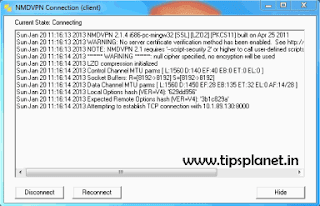
How to Configure Airtel UDP Port 53 Trick :
- Download and Install NMD VPN : [Click Here]
- Download UDP Port 53 Configuration File : [Click Here]
- Extract Configuration File and paste in C: >> Program Files >> NMDVPN >> config (Path May be different depending upon your installation)
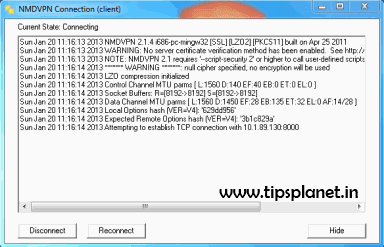
- Now Start NMD VPN and connect with the above Config (Windows 7 and 8 user’s need to Run NMD VPN As Administrator)
- While connecting with BookVPN server on NMD VPN, it will ask you for username and password. Enter below mentioned username and password.
Username : freeopenvpn
Password : J8hfCiu6W
- Now click connect and your secure VPN Connection will establish within seconds
You can also configure this trick for your Android Handset, by following this tutorial.
This trick is working all over the India. Just paste or replace the configuration file. You can almost get the download Speed of 1 MBPS “Of-course Bandwidth” from Airtel UDP Port 53 VPN.
If in case you are unable to connect through Airtel UDP Port 53 VPN then switch to the Default Profile for any issues do leave your message we will try to resolve it soon. If you face any issue in configuring the Airtel UDP 53 Trick then do leave a message. Like Us On Facebook and keep yourself updated.
Stay Tuned with Us for More Tips and Tricks :)
Wednesday, 16 January 2013
1
Wednesday, 16 January 2013
read more
Facebook Announces a New Internal Search Engine - Graph Search
Facebook has just announced “Graph Search” which they’re hoping will change the way you search for new friends,
connections and even answers on the social network. Facebook, CEO Mark Zuckerberg is careful to note that this is in no way a competitor to web search, it’s something different. Ordinary searches on Facebook will be instead handled by Bing, also announced as a new partnership. Graph Search on the other hand is designed to give you more specific answers to more specific queries, like the search below:

Facebook has over a billion people on the social network with more than a trillion connections. Graph Search allows you to personalize search and get the results most relevant to you by utilizing your connections and the people you interact with the most. If for example, you’re searching for a new restaurant in town to eat in, Graph Search would show you restaurants that your friends liked — as opposed to a web search or Yelp review which would also give you reviews, but they wouldn’t be from people you know or trust.
It’s also a great way to find common interests between you and your friends. A traditional way of doing this on Facebook would be to navigate to someone’s profile and go to their About Page then find what they have listed there. A Graph Search would instantly be able to tell you which of your friends are into Star Wars, so you could plan a movie night in a matter of minutes. Searches can also be made more specific to really narrow down your results. You could search for restaurants liked by friends that are in the food industry perhaps, using their taste and expertise to find the best of the best.

As for privacy concerns, the company has already thought of that — you can only view what you would normally be able to view elsewhere on Facebook. Graph Search is now rolling out in a very limited capacity as a beta for the web, and only for English users. It should arrive in more languages and to mobile in the coming months. For more click here.
See What Mark Zukerberg Says [Video]
Stay Tuned for More Tips and Tricks :)

Facebook has over a billion people on the social network with more than a trillion connections. Graph Search allows you to personalize search and get the results most relevant to you by utilizing your connections and the people you interact with the most. If for example, you’re searching for a new restaurant in town to eat in, Graph Search would show you restaurants that your friends liked — as opposed to a web search or Yelp review which would also give you reviews, but they wouldn’t be from people you know or trust.
It’s also a great way to find common interests between you and your friends. A traditional way of doing this on Facebook would be to navigate to someone’s profile and go to their About Page then find what they have listed there. A Graph Search would instantly be able to tell you which of your friends are into Star Wars, so you could plan a movie night in a matter of minutes. Searches can also be made more specific to really narrow down your results. You could search for restaurants liked by friends that are in the food industry perhaps, using their taste and expertise to find the best of the best.
As for privacy concerns, the company has already thought of that — you can only view what you would normally be able to view elsewhere on Facebook. Graph Search is now rolling out in a very limited capacity as a beta for the web, and only for English users. It should arrive in more languages and to mobile in the coming months. For more click here.
See What Mark Zukerberg Says [Video]
Stay Tuned for More Tips and Tricks :)
Wednesday, 9 January 2013
0
Wednesday, 9 January 2013
 Broadband is being used by millions of people around the world and also broadband is best way to get online from workplace or home. Broadband gives a very good speed but due to over usage the speed constantly gets down. So here question arises how to get good and stable speed? Today, it will be discussed on TipsPlanet.
We will use Google DNS Service which is publicly released by Google and its Domain Name System(DNS) service is free and very useful, you may also know about the open DNS servers which gave huge success but these servers are great and you may use them as they are absolutely free.
What is Google Public DNS?
Google Public DNS is a free, global Domain Name System (DNS) resolution service, that you can use as an alternative to your current DNS provider.
2. Click on Local Area Connection
3. Right Click to Local Area Connection to open Properties
4. Go to Internet Protocol Version 4
5. Choose use Preferred DNS Servers
6. And put
Comment & Share with Friends :)
read more
Increase Broadband Speed Using Google DNS Service
Broadband is being used by millions of people around the world and also broadband is best way to get online from workplace or home. Broadband gives a very good speed but due to over usage the speed constantly gets down. So here question arises how to get good and stable speed? Today, it will be discussed on TipsPlanet.
We will use Google DNS Service which is publicly released by Google and its Domain Name System(DNS) service is free and very useful, you may also know about the open DNS servers which gave huge success but these servers are great and you may use them as they are absolutely free.
8.8.8.8
8.8.4.4
What is Google Public DNS?
Google Public DNS is a free, global Domain Name System (DNS) resolution service, that you can use as an alternative to your current DNS provider.
How to Use Google Public DNS
2. Click on Local Area Connection
3. Right Click to Local Area Connection to open Properties
4. Go to Internet Protocol Version 4
5. Choose use Preferred DNS Servers
6. And put
8.8.8.8 in the above one and 8.8.4.4 in the below one.
Comment & Share with Friends :)
Friday, 4 January 2013
0
Friday, 4 January 2013
read more
How To Increase Internet Speed
Internet these days has become main source for the generation for staying connected with social networks, surfing, exploring websites, downloading but sometimes Internet gets down or even gets disconnected that stage is really irritating.
Also See : Tips To Increase Mobile Internet Speed
So today I am going to deliver some tips which will boost your computer internet connectivity and hence boost your internet speed.
 QoS Packet Scheduler is a method of network bandwidth management that can monitor the importance of data packets and depending upon the priority of the packet, give it higher or lower priority or bandwidth levels.
Normally, if your system's LAN cards don't support QoS Packet Scheduling, you don't have to worry about it.
It's not very useful unless you're using apps which are QoS-aware or running a server, so you can gain some network overhead back by turning it off.
Make sure you are logged in as 'Administrator'.
Speed Up Firefox
If you have a high-speed (Cable, DSL, etc.) connection this will surely increase your internet speed for pages with lots of content such as facebook, youtube etc.
Open Firefox and perform following steps :
1. Go To Address Bar and Type "about:config"(without quotation)
2. Look for addresses "network.http.pipelining" and " network.http.proxy.pipelinCing" set them both to true. (This adjust pipelining setting in firefox)
3. Again Look for address "network.http.pipelining.maxrequests" and set it to 8.
4. Right Click on anywhere on window and select "New" and then "Integer" copy this without quotes "nglayout.initialpaint.delay" and paste it and set value to 0 (Zero).
This increases your Internet Speed :)
Comment & Share with Friends :)
Also See : Tips To Increase Mobile Internet Speed
So today I am going to deliver some tips which will boost your computer internet connectivity and hence boost your internet speed.
Tips To Increase Internet Speed
QoS Packet Scheduler is a method of network bandwidth management that can monitor the importance of data packets and depending upon the priority of the packet, give it higher or lower priority or bandwidth levels.Normally, if your system's LAN cards don't support QoS Packet Scheduling, you don't have to worry about it.
It's not very useful unless you're using apps which are QoS-aware or running a server, so you can gain some network overhead back by turning it off.
Make sure you are logged in as 'Administrator'.
- Start > Run > Type "gpedit.msc"(without quotation)
- Expand the Local Computer Policy branch.
- Expand the Administrative Templates branch.
- Expand the Network branch.
- Highlight the "QoS Packet Scheduler" in left window.
- In right window double click the "limit reversible bandwidth" setting.
- On setting tab check the Enabled item.
- Where it says "Bandwidth limit %" change it to read 0 (ZERO).
- Close the window.
Note : Changes take place immediately on system or after reboot.
Speed Up Firefox
If you have a high-speed (Cable, DSL, etc.) connection this will surely increase your internet speed for pages with lots of content such as facebook, youtube etc.
Open Firefox and perform following steps :
1. Go To Address Bar and Type "about:config"(without quotation)
2. Look for addresses "network.http.pipelining" and " network.http.proxy.pipelinCing" set them both to true. (This adjust pipelining setting in firefox)
3. Again Look for address "network.http.pipelining.maxrequests" and set it to 8.
4. Right Click on anywhere on window and select "New" and then "Integer" copy this without quotes "nglayout.initialpaint.delay" and paste it and set value to 0 (Zero).
This increases your Internet Speed :)
Comment & Share with Friends :)
Sunday, 21 October 2012
0
Sunday, 21 October 2012
read more
Facebook Introduces New Features for Photo Albums
Facebook, world largest social networking site has introduced a new feature for photo albums, that help us to get a great experience from our photo albums. There is a change in the theme of Photos and Albums. Many cool features has been added by Facebook, which provides great user experience.
Also See : Get Rs. 50 Recharge for Registering with Facebook
Check Out New Features for Photo Albums below :
1. You can ‘Create New Album’ as shown in the below page. A three column design for Albums is being provided by Facebook better than ever.

2. One of the great features is that you can move your mouse cursor on an Album to see a slideshow of the pictures in that Album.
3. You can ‘Add New Photos’ as shown in the below page. A four column design for photos is provided by Facebook.

4. You can also ‘Highlight’ a picture easily with a single click. Highlighting a picture will show a bigger thumbnail of that picture in photos.

5. You can ‘Add Location’ to any of your photos by clicking on the pencil and selecting Add Location.

6. You can ‘Like’ or ‘Comment’ on any of the photos by selecting the particular option on the photo itself without opening it.
Comment & Share with Friends :)
Also See : Get Rs. 50 Recharge for Registering with Facebook
Check Out New Features for Photo Albums below :
1. You can ‘Create New Album’ as shown in the below page. A three column design for Albums is being provided by Facebook better than ever.

2. One of the great features is that you can move your mouse cursor on an Album to see a slideshow of the pictures in that Album.
3. You can ‘Add New Photos’ as shown in the below page. A four column design for photos is provided by Facebook.

4. You can also ‘Highlight’ a picture easily with a single click. Highlighting a picture will show a bigger thumbnail of that picture in photos.

5. You can ‘Add Location’ to any of your photos by clicking on the pencil and selecting Add Location.

6. You can ‘Like’ or ‘Comment’ on any of the photos by selecting the particular option on the photo itself without opening it.
Comment & Share with Friends :)
0
read more
Download Your Youtube Videos in Original Format via Google Takeout
Earlier there was certain limitations on downloading your own videos from Youtube. Though, you can download videos through Video Manager from Youtube but it has few limitations on quality of videos. In case you uploaded a HD video in YouTube of 720-pixel or 1080-pixel and when you download the same video via Video Manager will squeeze it into 480-pixel and will be saved in MP4 format. This limitation was one of the main drawback in YouTube due to which many users were restricting themselves from uploading their videos on YouTube.
Also See : Download Youtube Videos without Any Software
If this limitation is stopping you from uploading your video on YouTube, then no need to worry. Google had recently announced a new feature in Google Takeout where you can download your own uploaded videos from YouTube in their original format, the way you uploaded in YouTube. User can choose to download all uploaded YouTube videos in an archive file.
Steps To Download Youtube Videos via Google Takeout
1. Go to Google Takeout [Click Here]
2. Click on Create Archive button. Google will start creating an archive’s files of all video which you have uploaded in YouTube. Building an archive file may take some time, depending on the file size and number of videos.

2. Once the archive is complete, you can proceed to download by clicking on Download button. In case the file size is greater than 2GB then Google Takeout will split them into the individual file of 2GB each.

Comment & Share with Friends :)
Also See : Download Youtube Videos without Any Software
If this limitation is stopping you from uploading your video on YouTube, then no need to worry. Google had recently announced a new feature in Google Takeout where you can download your own uploaded videos from YouTube in their original format, the way you uploaded in YouTube. User can choose to download all uploaded YouTube videos in an archive file.
Steps To Download Youtube Videos via Google Takeout
1. Go to Google Takeout [Click Here]
2. Click on Create Archive button. Google will start creating an archive’s files of all video which you have uploaded in YouTube. Building an archive file may take some time, depending on the file size and number of videos.

2. Once the archive is complete, you can proceed to download by clicking on Download button. In case the file size is greater than 2GB then Google Takeout will split them into the individual file of 2GB each.

Note : Google Takeout doesn't provide any option to choose individual videos from YouTube.
Comment & Share with Friends :)
Thursday, 23 August 2012
0
Thursday, 23 August 2012
read more
How To Delete Facebook Messages In Bulk
Facebook is a great social networking website, people used to chat with so many people around the world. All the chat are stored in our account but you can't delete all chats or bulk messages with one click because facebook, by default, doesn't provide 'delete all' button to erase all Facebook messages in your account. You'll have to go to each and every message, open it and then delete it. This is a bit tiring and irritating if you've thousand of messages in your Facebook inbox. As we know there is solution for every problem.
Must See : How to Go Offine to Single Pesron on Facebook
In order to delete all messages on Facebook, a Google Chrome extension called "Facebook Fast Delete Messages" comes in mind. Once installed, you'll see new "Delete All" button next to the "New Message".

This new extension will help you delete or remove all messages from your Facebook profile in a single click.
Link : [Facebook Fast Delete Messages]
Comment & Share with Friends :)
Must See : How to Go Offine to Single Pesron on Facebook
In order to delete all messages on Facebook, a Google Chrome extension called "Facebook Fast Delete Messages" comes in mind. Once installed, you'll see new "Delete All" button next to the "New Message".

This new extension will help you delete or remove all messages from your Facebook profile in a single click.
Link : [Facebook Fast Delete Messages]
Comment & Share with Friends :)
Saturday, 28 July 2012
0
Saturday, 28 July 2012
read more
Tips to Increase Mobile Internet Speed
Mobile Internet these days has become main source for the youngster for staying connected with social networks, surfing, downloading sometimes Internet gets down or even gets disconnected that stage is really irritating and it pisses everyone off.
So today I am going to give some tips which will boost your mobile internet connectivity and hence gain some more speed.
 1. Breaking all the Bonds, using mobile internet or EDGE in a congested room entirely covered with walls and think plates can cause decrease in mobile internet service so better to use it in open area without any walls or anything.
2. Find some near Hotspot and use their internet as its fast and more active. As they are connected to a broadband which they are simply distributing through Wi-Fi so you can take advantage of that thing and enjoy faster speeds.
3. Using mobile internet in Off Peak hours can seriously boost up the speed because the using traffic is really low the times which is suitable for this thing is @ night, so try to use it in night as it can really help you out.
4. Updating your Mobile Firmware can get new settings or mods for your phone which can rapidly increase speed and gain more connectivity so every month always check that if there are any updates for your phone.
5. Well the last thing can cost you some BUCKS but may show you some increase in your speed is that purchase booster i.e. antenna which can rapidly capture more signals and gain more connectivity so you can try this one if you find one.
These were the 5 tips which will surely boost your mobile internet connection and giver you faster Facebook Access.
Comment & Share with Friends :)
So today I am going to give some tips which will boost your mobile internet connectivity and hence gain some more speed.
Tips to Increase Mobile Internet Speed
 1. Breaking all the Bonds, using mobile internet or EDGE in a congested room entirely covered with walls and think plates can cause decrease in mobile internet service so better to use it in open area without any walls or anything.
2. Find some near Hotspot and use their internet as its fast and more active. As they are connected to a broadband which they are simply distributing through Wi-Fi so you can take advantage of that thing and enjoy faster speeds.
3. Using mobile internet in Off Peak hours can seriously boost up the speed because the using traffic is really low the times which is suitable for this thing is @ night, so try to use it in night as it can really help you out.
4. Updating your Mobile Firmware can get new settings or mods for your phone which can rapidly increase speed and gain more connectivity so every month always check that if there are any updates for your phone.
5. Well the last thing can cost you some BUCKS but may show you some increase in your speed is that purchase booster i.e. antenna which can rapidly capture more signals and gain more connectivity so you can try this one if you find one.
These were the 5 tips which will surely boost your mobile internet connection and giver you faster Facebook Access.
Comment & Share with Friends :)
0
read more
Cool Facebook Tips And Tricks For Better Social Networking
Hey Friends, Today am going to share some cool facebook tips and tricks. Recently I posted many topics on facebook, but today something is new. If you wish to watch live tv, send free sms, or want to delete permanently your facebook account read below.

As we all know facebook is great place to hang on with friends, and its also a largest social networking site with more than 2 Billion User from all over the world. You can do many more things on facebook expect chatting, commenting etc..
1. Watch Live TV on Facebook
TVdream Application of facebook provides free streaming live TV channels.You can watch a lot of International Channels using this Application.TVdream works fine with slow internet connection you can even buffer on 2G connection. London Olympics 2012 are also broadcasted on this channel.
Link : [Watch Live TV]
2. Send Free SMS World Wide Using Facebook
Now you can send free sms world wide from facebook.The message sending service is very fast and takes only few seconds to reach the destination. All this is possible with a cool facebook application.

You can easily create a video with your Facebook Pictures.To create a video with your facebook photos go to pixable.com.
Link : [Click Here]
4. Want To Delete Facebook Account Completely
 Most of us are confused between deleting and deactiving their Facebook Account. Deactivating is completely different thing from deleting your account permanently. To completely delete facebook account means erasing all your data from facebook server.
Permanently deleting a facebook account url is not avaialble readily.It is not visible easily because it doesnt exist in your account settings/options.It exists in facebook help and very difficult to replace it with your profile link.
Link : [ Delete Facebook Account]
5. Trick To Publish Blank Status
Login to your facebook account. Then click on update status and enter the following code and hit enter.
You can find who deleted or unfriended you on facebook using an application called who deleted me on facebook? This application will back up all your friends list when you sign up for the first time and notifies via mail whenever there is a change in your friends list.
Link : [Who Deleted Me]
Comment & Share with Friends :)
As we all know facebook is great place to hang on with friends, and its also a largest social networking site with more than 2 Billion User from all over the world. You can do many more things on facebook expect chatting, commenting etc..
1. Watch Live TV on Facebook
TVdream Application of facebook provides free streaming live TV channels.You can watch a lot of International Channels using this Application.TVdream works fine with slow internet connection you can even buffer on 2G connection. London Olympics 2012 are also broadcasted on this channel.
Link : [Watch Live TV]
2. Send Free SMS World Wide Using Facebook
Now you can send free sms world wide from facebook.The message sending service is very fast and takes only few seconds to reach the destination. All this is possible with a cool facebook application.
- Login to Facebook Account.
- Go to [Facebook Chat Application]
- Check Snap Shot of Application

- Select Your Country
- In the next line enter the mobile number to which you want to send sms.
- Enter your message and click button "Send SMS"
- You can send only sms upto 100 characters.
- Only 4 SMS per day :(
You can easily create a video with your Facebook Pictures.To create a video with your facebook photos go to pixable.com.
Link : [Click Here]
4. Want To Delete Facebook Account Completely
 Most of us are confused between deleting and deactiving their Facebook Account. Deactivating is completely different thing from deleting your account permanently. To completely delete facebook account means erasing all your data from facebook server.
Permanently deleting a facebook account url is not avaialble readily.It is not visible easily because it doesnt exist in your account settings/options.It exists in facebook help and very difficult to replace it with your profile link.
Link : [ Delete Facebook Account]
5. Trick To Publish Blank Status
Login to your facebook account. Then click on update status and enter the following code and hit enter.
@[2:2:]6. How To Who Deleted/Unfriend You On Facebook
You can find who deleted or unfriended you on facebook using an application called who deleted me on facebook? This application will back up all your friends list when you sign up for the first time and notifies via mail whenever there is a change in your friends list.
Link : [Who Deleted Me]
Comment & Share with Friends :)
Saturday, 14 July 2012
1
Saturday, 14 July 2012
read more
Top 20 Facebook Status
Hiii as you all know facebook a very large part of our social life. This post gives an opportunity to check that your status will be liked for sure.

Here are Top 20 Facebook Status
1.Teacher: Whoever answers my next question can go home. *Boy throws bag out the window* Teacher: Who threw that? Boy: Me, I`m going home
2. That awkward moment when you get home from school and look at yourself in the mirror thinking `did I really look like this all day?`
3. I don’t understand banks. Why do they attach chains to their pens. If I’m trusting you with my money, you should trust me with your pens.
4. Why do we use our blankets as shields at night? Like is the monster gonna be like ” oh shit…..they have a blanket..RRRUUUUNNN!!!!”
5. Apple and Blackberry should team up and make a phone called the Pie.
6. That awkward moment when you get home from school and look at yourself in the mirror thinking `did I really look like this all day?`
7. That Awkward Moment when a GPS tells a gay person to go straight.
8. "Dad, I`m hungry." "Hi, Hungry. I`m Dad." "Dad, I`m serious." "I thought you were Hungry?" "Are you kidding me?" "Nope, I`m Dad."
9. My alarm clock is clearly jealous of my amazing relationship with my bed.
10. When I Die, Someone Should Keep Updating My Status To Freak Out People.
11. I watched Transformers today, and I`ve spent the past 2 hours in my garage telling my car I know his secret... He`s shy.
12. If A Couple in Love are called Love Birds, then a couple who`ve fought with each other should be called Angry Birds.
13. She`s so fake if you look behind her neck it says "made in china"
14. Roses are red, Facebook is blue, No mutual friends, Who the f*ck are you?
15. The walk of shame at the store when you have to put something back because your mom says "no."
16. TOP 5 Lies People Tell -
1) I`m fine.
2) That was my last piece of gum.
3) I`ll call you back.
4) I`m on my way.
5) I never got that text.
17. Oooooh, thats a bit too harsh. Let me put a `lol` at the end of it.
18. LIKE IF:I walk into a room, forget what I need, I walk out, and then remember.
19. That moment when you`re watching a dancing show with your parents. Inside: Imagining yourself doing those moves. Outside: Poker face
20. If you are trapped between your feelings and what other people think is right, always go for whatever makes you happy.
Comment & Share with Friends :)

Here are Top 20 Facebook Status
1.Teacher: Whoever answers my next question can go home. *Boy throws bag out the window* Teacher: Who threw that? Boy: Me, I`m going home
2. That awkward moment when you get home from school and look at yourself in the mirror thinking `did I really look like this all day?`
3. I don’t understand banks. Why do they attach chains to their pens. If I’m trusting you with my money, you should trust me with your pens.
4. Why do we use our blankets as shields at night? Like is the monster gonna be like ” oh shit…..they have a blanket..RRRUUUUNNN!!!!”
5. Apple and Blackberry should team up and make a phone called the Pie.
6. That awkward moment when you get home from school and look at yourself in the mirror thinking `did I really look like this all day?`
7. That Awkward Moment when a GPS tells a gay person to go straight.
8. "Dad, I`m hungry." "Hi, Hungry. I`m Dad." "Dad, I`m serious." "I thought you were Hungry?" "Are you kidding me?" "Nope, I`m Dad."
9. My alarm clock is clearly jealous of my amazing relationship with my bed.
10. When I Die, Someone Should Keep Updating My Status To Freak Out People.
11. I watched Transformers today, and I`ve spent the past 2 hours in my garage telling my car I know his secret... He`s shy.
12. If A Couple in Love are called Love Birds, then a couple who`ve fought with each other should be called Angry Birds.
13. She`s so fake if you look behind her neck it says "made in china"
14. Roses are red, Facebook is blue, No mutual friends, Who the f*ck are you?
15. The walk of shame at the store when you have to put something back because your mom says "no."
16. TOP 5 Lies People Tell -
1) I`m fine.
2) That was my last piece of gum.
3) I`ll call you back.
4) I`m on my way.
5) I never got that text.
17. Oooooh, thats a bit too harsh. Let me put a `lol` at the end of it.
18. LIKE IF:I walk into a room, forget what I need, I walk out, and then remember.
19. That moment when you`re watching a dancing show with your parents. Inside: Imagining yourself doing those moves. Outside: Poker face
20. If you are trapped between your feelings and what other people think is right, always go for whatever makes you happy.
Comment & Share with Friends :)
1
read more
Receive SMS Alerts Whenever a New Email Popped Up in Gmail
All of us know about Way2Sms.Com as free message sending website but only few know that now Way2Sms.Com can be used to receive alerts whenever a new mail popped in Gmail. This facility is provided by Way2Sms.Com which is very useful for people who don't own a smartphone or no internet connection is available.
How to Configure Gmail Alerts via Way2Sms ?


That’s it! You’ll now receive mobile SMS alerts for every incoming mail that your Gmail ID gets.
Comment & Share with Friends :)
How to Configure Gmail Alerts via Way2Sms ?
- Login to your Way2Sms Account or Sign Up if you don't have Way2Sms Account.
- Go To "Mail Alerts" Tab and copy the mail forwarding address.

- Now, Login to your Gmail Account and select "Settings"
- Select the “Forwarding and POP/IMAP” tab and choose “Forward a copy of incoming mail to” option and enter the forwarding address that you’ve copied in step 2.

- Ensure that you select the "Keep Gmail's copy in the inbox" option
- Confirm with the verification code that you'll receive on your mobile in Gmail verification box.
That’s it! You’ll now receive mobile SMS alerts for every incoming mail that your Gmail ID gets.
Note : You can try this procedure with any Email service provider that allows mail forwarding service.
Comment & Share with Friends :)
Friday, 13 July 2012
0
Friday, 13 July 2012
read more
Block Ads on Youtube Videos in Mozilla Firefox, Opera and Google Chrome
Do you watch lots of Videos or Movies on Youtube like others. But these days most of the videos are having advertisement which irritates a lot while watching videos on Youtube. Googling has landed a wonderful plugin which when installed, blocks the Youtube videos ad while watching.
 Once installed and activated, all the advertisement displayed along with the videos will be blocked.
Here is the Demo showing what an AdBlock Extension can do
Comment & Share with Friends :)

- AdBlock Video Firefox Add-on : A Firefox plugin that block ads not only on Youtube but also on different video streaming sites like Fox, ABC, Metacafe etc.
- YouTube Option for Google Chrome : It's a Google Chrome extension that lets you block not only ads but also the video annotations, auto-play etc. This extension gives you more options to customize your video watching.
- Youtube AdsFree for Opera : It's a very useful and pretty good extension for Opera browser users to prevent advertisement appearing on video streaming site, Youtube.
Here is the Demo showing what an AdBlock Extension can do
Comment & Share with Friends :)
Wednesday, 11 July 2012
0
Wednesday, 11 July 2012
read more
How to Go Offline to Single Person on Facebook
Now you can go offline to a single individual person and remain be visible to all other friends on facebook.
Some times you may feel irritated with some person and would like to stay away from that person then you can go offline to him instead of going offline to everyone.That would not be able to see you and you would not be able to see him online.
See Image

Comment & Share with Friends :)
Some times you may feel irritated with some person and would like to stay away from that person then you can go offline to him instead of going offline to everyone.That would not be able to see you and you would not be able to see him online.
See Image
Comment & Share with Friends :)
Tuesday, 10 July 2012
0
Tuesday, 10 July 2012
read more
Use Themes on Facebook, Change Facebook Backgroud Themes Colours
Change Facebook Background Themes Colour
Facebook is great place to hang out .Its default layout colour is blue.Facebook doesnot provide any official themes but Now it is possible to change your own facebook account theme as you like. You can make your facebook profile more colorful . You also able to set you own background Image on you facebook account.there are many ways to change your facebook themes.

Click below to Download and Install
Facebook is great place to hang out .Its default layout colour is blue.Facebook doesnot provide any official themes but Now it is possible to change your own facebook account theme as you like. You can make your facebook profile more colorful . You also able to set you own background Image on you facebook account.there are many ways to change your facebook themes.

Using Stylish Firefox Add-ons
Stylish lets you easily install themes and skins for Google, Facebook, YouTube, Orkut and many other sites. You can even customize Firefox and other programs themselves.Click below to Download and Install
Link To DownloadRestart the Firefox and Go To following link
Go To Link
- Click on theme you like and install the script.
- After you login to Facebook you can view the changed Facebook theme.
Subscribe to:
Posts (Atom)


