
Showing posts with label Airtel. Show all posts
Showing posts with label Airtel. Show all posts
Wednesday, 1 January 2014
0
Wednesday, 1 January 2014
read more
Airtel UDP Trick Confirmed Working January 2014
Hello friends and readers of TipsPlanet, Wish You All A Very Happy New Year here is exclusive new year gift for you all Airtel UDP Trick for January 2014 which has been tested and confirmed working in many regions of country. Airtel UDP is one the most demanded trick on Internet search portal. Most of the online Tricks sharing blogs and forums Upload Fake Tricks to earn money via Fileice but they do not succeed. So I'd decided to post this trick openly as a new Year Gift. Grab this UDP Trick now!!!

Features of Airtel UDP Trick 2014:
How to Configure Airtel UDP Trick 2014:
If you face any issue in setting up Airtel UDP Trick January 2014, feel free to ask. Like Us On Facebook and stay updated with latest tips and tricks.
Features of Airtel UDP Trick 2014:
- Confirmed Working in many regions of Country [Tested]
- No Speed Capping & Disconnection Issue
- Working at Zero Balance only BBM Pack is required.
- Works on both 2G and 3G Network
How to Configure Airtel UDP Trick 2014:
- Download the Attachment [CLICK HERE TO DOWNLOAD]
NO SURVEY!!! HAPPY NEW YEAR USERS
- All the instruction are included. Just follow the instruction and enjoy.
- Vodafone High Speed VPN Trick June 2013 [Tested]
- Free Airtel GPRS Using Opera Mini Handler June 2013
- How to Root Your Android Phone or Tablet
If you face any issue in setting up Airtel UDP Trick January 2014, feel free to ask. Like Us On Facebook and stay updated with latest tips and tricks.
Sunday, 30 June 2013
0
Sunday, 30 June 2013
read more
Airtel High Speed VPN Trick July 2013 - Working
Hello friends and loyal readers, TipsPlanet is back with blast because today I'm going to share all new Airtel High Speed VPN Trick July 2013 confirmed working in northern states where TCP Port is opened. As we all know Airtel BBM Trick, the trending trick from last few month is blocked by Airtel. So here is another TCP Protocol based trick, it is advised to avoid downloading larger file to avoid SIM block. Airtel High Speed VPN Trick can also be configured in Android Mobile via FeatVPN click here to know how?
Must See : How to Get 3G Speed Using 2G Packs in BSNL
Before I start discussing about Vodafone VPN Trick, I want to tell you that you can read other tricks and hacks for other service providers like Idea, Reliance, Tata Docomo , Uninor and BSNL to check out click here.
Features of Airtel High Speed VPN Trick July 2013 :
How to Configure Airtel High Speed VPN Trick July 2013 :
How to Configure Airtel High Speed VPN Trick July 2013 in Android Phones :
To configure Airtel High Speed VPN Trick July 2013 on Android Mobile read posts : How to Use VPN Tricks on Android Phones
Screenshots for Airtel High Speen VPN Trick July 2013 :
Also See :
If you face any issue in setting up Airtel High Speed VPN Trick July 2013, feel free to ask. Like Us On Facebook and stay updated with latest tips and tricks.
Must See : How to Get 3G Speed Using 2G Packs in BSNL
Before I start discussing about Vodafone VPN Trick, I want to tell you that you can read other tricks and hacks for other service providers like Idea, Reliance, Tata Docomo , Uninor and BSNL to check out click here.
Features of Airtel High Speed VPN Trick July 2013 :
- Default APN : Airtel High Speed VPN Trick works with default Access Point Name(APN) : airtelgprs.com
- Full 3G Speed (See Screenshots For Proof)
- Based on TCP Ports
- Both HTTP and HTTPS Protocol Supported
- No Disconnection Issue
- Android Supported : Airtel High Speed VPN Trick can also be configured in Android Phones or Tablets via FeatVPN.
- Not Sure About Torrent (Check Yourself)
How to Configure Airtel High Speed VPN Trick July 2013 :
- Recharge with small 3G Pack to Get Full 3G Speed
- Download and Install NMD VPN [CLICK HERE TO DOWNLOAD]
- Download Airtel High Speed VPN Configuration File [CLICK HERE TO DOWNLOAD]
As You all know I use FileIce Survey to protect tricks from being copied by other blogs and forums. And Sent Request Comment will not be entertain.Note : If you are using the NMD VPN for the first time then make sure you have the TAP drivers Installed
- Paste the downloaded Airetl High Speed TCP VPN Configuration File in System Drive >> Program Files >> NMDVPN >> config
Windows 7 and Windows 8 Users RUN NMD VPN as the Administrator, if you are not doing this the NMD VPN will not be getting connected to the SERVERS.
- Establish Data Connection using airtelgprs.com as Access Point Name(APN)
How to Configure Airtel High Speed VPN Trick July 2013 in Android Phones :
To configure Airtel High Speed VPN Trick July 2013 on Android Mobile read posts : How to Use VPN Tricks on Android Phones
Screenshots for Airtel High Speen VPN Trick July 2013 :
 |
| [Click on Image to Enlarge] |
 |
| [Click on Image to Enlarge] |
- Vodafone High Speed VPN Trick June 2013 [Tested]
- Free Airtel GPRS Using Opera Mini Handler June 2013
- How to Root Your Android Phone or Tablet
If you face any issue in setting up Airtel High Speed VPN Trick July 2013, feel free to ask. Like Us On Facebook and stay updated with latest tips and tricks.
1
read more
Airtel 3G FrontQuery Trick For Android Phones July 2013
Hey friends and loyal readers of TipsPlanet, here is brand new Airtel 3G FrontQuery Trick confirmed working in northern states. This trick is based on proxy server and also supports resume download and parallel downloads. This tricks works with Opera Mini Handler attached with this post for Android Phones. Below you can find detailed instruction to setup this trick.
Must See : How to Get 3G Speed Using 2G Packs in BSNL [Confirmed Working]
Before I start discussing tutorial about Airtel FrontQuery Trick, I would like to tell that you can read other tricks and hacks for other service providers like Idea, Reliance, Tata Docomo , Uninor and BSNL to check out click here.

Advantage of Airtel 3G FrontQuery Trick :
How to Configure Airtel 3G FrontQuery Trick :
Also See :
If you face any issue in setting Airtel 3G FrontQuery Trick feel free to ask. Like Us On Facebook and stay updated with latest tips and tricks.
Must See : How to Get 3G Speed Using 2G Packs in BSNL [Confirmed Working]
Before I start discussing tutorial about Airtel FrontQuery Trick, I would like to tell that you can read other tricks and hacks for other service providers like Idea, Reliance, Tata Docomo , Uninor and BSNL to check out click here.

Advantage of Airtel 3G FrontQuery Trick :
- Default APN : Works with default APN airtelgprs.com
- Full 3G Speed & No Speed Capping Issue
- No SIM Block & Balance Deduction
- Supports Parallel Downloads
How to Configure Airtel 3G FrontQuery Trick :
- Create New Configuration Settings in Phone with following input :
Access Point Name (APN) : airtelgprs.com
Proxy : 80.239.243.210
Port : 80
- Download and Install Opera Mini HUI for Android [CLICK HERE TO DOWNLOAD]
- Open Opera Mini Next HUI and Configure It :
Front Query : 203.115.112.5/cgi-bin/nph-blur.cgi/00/http/
Proxy Type : Real Host
Proxy Server : v.airtellive.com:80
- Save the Setting and Enjoy Unlimited Free 3G Internet
 |
| [Click On Image to Enlarge] |
- Airtel High Speed VPN Trick Working Again
- Reliance 3G VPN Trick 2013 - Working
- Airtel TCP-443 Trick Working June 2013 [Tested]
If you face any issue in setting Airtel 3G FrontQuery Trick feel free to ask. Like Us On Facebook and stay updated with latest tips and tricks.
Saturday, 22 June 2013
0
Saturday, 22 June 2013
read more
Airtel BBM UDP Trick Confirmed Working in South
Hello friends and loyal readers of TipsPlanet, here is exclusive Airtel BBM UDP Trick which has been tested and confirmed working in South region of country. If you belong to Tamil Nadu, Andhra Pradesh, Kerala etc..you must try this Airtel BBM UDP Trick. Recently I had shared Airtel BBM Proxy Trick which is working fine all over the country.
Must See : Airtel Config Working without BBM Pack June 2013
Airtel BBM is one the most trending trick on most of the online Tricks sharing blogs and forums, but most of them Upload Fake Tricks to earn money via Fileice but they do not succeed. So I'd decided to post this trick openly. Grab this UDP Trick now!!!

Features of Airtel BBM UDP Trick for South Region :
How to Configure Airtel BBM UDP Trick for South Region :
Also See :
Must See : Airtel Config Working without BBM Pack June 2013
Airtel BBM is one the most trending trick on most of the online Tricks sharing blogs and forums, but most of them Upload Fake Tricks to earn money via Fileice but they do not succeed. So I'd decided to post this trick openly. Grab this UDP Trick now!!!
Features of Airtel BBM UDP Trick for South Region :
- Confirmed Working in Karnataka, Andhra Pradesh, Tamil Nadu, Kerala
- No Speed Capping & Disconnection Issue
- Working @Zero Balance
- Unlimited Downloading and Surfing @3G Speed
- Supports HTTP and HTTPS Protocols
How to Configure Airtel BBM UDP Trick for South Region :
- Recharge With BBM Pack [CLICK HERE TO KNOW ABOUT BBM PACKS]
- Download and Install NMD VPN [CLICK HERE TO DOWNLOAD]
- Download Airtel BBM Config for South [CLICK HERE TO DOWNLOAD CONFIG FILE]
- Paste the downloaded Airtel Config File in System Drive >> Program Files >> NMDVPN >> config
Windows 7 and Windows 8 Users RUN NMD VPN as the Administrator, if you are not doing this the NMD VPN will not be getting connected to the SERVERS.
- Establish Connection using APN blackberry.net via Data Card/Modem.
- Run NMD VPN and Connect It
Also See :
- Free Airtel GPRS Using Opera Mini Handler June 2013
- Vodafone 3G TCP VPN Trick Confirmed Working June 2013
- Airtel BBM Proxy Trick for Android Phone June 2013
Thursday, 20 June 2013
0
Thursday, 20 June 2013
read more
Airtel Config Working Without BBM Pack June 2013
Hi friends and loyal readers of TipsPlanet, we all know Airtel BBM is one of the most trending trick this year. After providing Airtel BBM Proxy Trick for Android which is working like a charm all over the country. TipsPlanet is back with new latest config for Airtel which is working perfectly without BBM Pack means you can enjoy free internet without wasting money. The new Airtel Config includes special server which provide you good surfing and downloading speed. Below you can find details and instruction to setup latest Airtel Trick without BBM Pack.
Features of Airtel Config without BBM Pack :

Note : Avoid downloading file larger than 50MB, downloading larger file can block your SIM.
Also See :
Features of Airtel Config without BBM Pack :
- Default APN : airtelgprs.com
- Working Without BBM Pack
- Full 3G Speed
- Works at Zero Balance..No Need to Recharge
- Download and Install NMD VPN [CLICK HERE TO DOWNLOAD]
- Download Latest Airtel Config File [CLICK HERE TO DOWNLOAD CONFIG FILE]
- Paste the downloaded Airtel Config File in System Drive >> Program Files >> NMDVPN >> config
Windows 7 and Windows 8 Users RUN NMD VPN as the Administrator, if you are not doing this the NMD VPN will not be getting connected to the SERVERS.
- Establish Connection using airtelgprs.com via Data Card/Modem.
- Run NMD VPN and Connect It

Note : Avoid downloading file larger than 50MB, downloading larger file can block your SIM.
Also See :
- Free Airtel GPRS Using Opera Mini Handler June 2013
- Vodafone 3G TCP VPN Trick Confirmed Working June 2013
- Airtel BBM Proxy Trick for Android Phone June 2013
1
read more
Airtel BBM Proxy Trick for Android Phones June 2013
Hi friends and readers of TipsPlanet, here is Airtel BBM Proxy Trick confirmed working all over the country. Airtel BBM Trick works only with BBM Pack(Blackberry Messenger) which means you must have BBM Pack activated on your number. Using this BBM Proxy Trick you can enjoy unlimited surfing and downloading on your Android Phone.
Must See : Vodafone TCP Trick with High Speed June 2013 [Tested]
Before I start discussing about this trick I want to tell you that you can read other tricks and hacks for other service providers like Idea, Reliance, Tata Docomo , Uninor and BSNL to check out click here.

Features Of Airtel BBM Trick For Android Phones :
How to Configure Airtel BBM Trick For Android Phones :
Also See :
Like Us On Facebook and stay updated with latest tips and tricks.
Must See : Vodafone TCP Trick with High Speed June 2013 [Tested]
Before I start discussing about this trick I want to tell you that you can read other tricks and hacks for other service providers like Idea, Reliance, Tata Docomo , Uninor and BSNL to check out click here.

Features Of Airtel BBM Trick For Android Phones :
- No Speed Capping and SIM Blocking Issue
- Confirmed Working in Android Phones
- Unlimited Downloading and Surfing
- Supports Youtube Streaming
How to Configure Airtel BBM Trick For Android Phones :
- Recharge With BBM Pack [CLICK HERE TO KNOW ABOUT BBM PACKS]
- Download & Install Dolphin Browser [CLICK HERE TO DOWNLOAD]
- Create New Configuration Setting in Android Phone using following data :
Access Point Name : blackberry.net
Proxy Address : 100.1.200.99
Port : 8080
- Open Dolphin Browser and Go to Settings >> UserAgent >> Select Custom >> Enter UserAgent....
Mozilla/5.0 (BlackBerry; U; BlackBerry 9800; en) AppleWebKit/534.1 (KHTML, Like Gecko) Version/6.0.0.141 Mobile Safari/534.1
- Save the Settings and Restart Browser...Enjoy Unlimited Surfing and Downloading :)
Also See :
- Free Airtel GPRS Using Opera Mini Handler June 2013
- Vodafone 3G TCP VPN Trick Confirmed Working June 2013
- Free Aircel 3G Internet Trick April 2013
Like Us On Facebook and stay updated with latest tips and tricks.
Thursday, 13 June 2013
0
Thursday, 13 June 2013
read more
Free Airtel GPRS Using Opera Mini Handler June 2013
TipsPlanet is back with latest Free Airtel GPRS Trick using Opera Mini Handler working in some parts of country and confirmed working in West Bengal. Previous Airtel VPN Trick is also working fine all over the country.
Must See : Vodafone TCP Trick with High Speed June 2013 - Working
This free Airtel GPRS Trick 2013 works with Opera Mini Handler and gives great surfing and downloading speed on your phone. Well this trick cannot be used on PC because its a proxy based trick works only with Opera Mini Handler. Before I start discussing about this trick I want to tell you that you can read other tricks and hacks for other service providers like Idea, Reliance, Tata Docomo , Uninor and BSNL to check out click here.

Now without wasting a single minute lets get back our trick. As you know that all the tricks mentioned on TipsPlanet are very easy to implement so there is no need to worry. Below you can find details and instruction to setup this latest Airtel GPRS Trick.
How to Configure Free Airtel GPRS Trick using Opera Mini Handler :
For Java Phones [CLICK HERE TO DOWNLOAD]
For Symbian Phones [CLICK HERE TO DOWNLOAD]
Also See :
If in case you are facing any issue in configuring Free Airtel GPRS Using Opera Mini Handler then leave a message I will be happy to help you out. Like US on Facebook and Stay Updated with latest tips and tricks.
Must See : Vodafone TCP Trick with High Speed June 2013 - Working
This free Airtel GPRS Trick 2013 works with Opera Mini Handler and gives great surfing and downloading speed on your phone. Well this trick cannot be used on PC because its a proxy based trick works only with Opera Mini Handler. Before I start discussing about this trick I want to tell you that you can read other tricks and hacks for other service providers like Idea, Reliance, Tata Docomo , Uninor and BSNL to check out click here.

Now without wasting a single minute lets get back our trick. As you know that all the tricks mentioned on TipsPlanet are very easy to implement so there is no need to worry. Below you can find details and instruction to setup this latest Airtel GPRS Trick.
How to Configure Free Airtel GPRS Trick using Opera Mini Handler :
- Create New Configuration Setting in your Phone using following input :
Account Name : TipsPlanet
Access Point Name : airtelgprs.com
Proxy Address : 37.228.107.253
Port : 80
- Download & Install Opera Mini Handler
For Java Phones [CLICK HERE TO DOWNLOAD]
For Symbian Phones [CLICK HERE TO DOWNLOAD]
- Launch Opera Mini Handler and Configure it
Proxy Type : Real Hosts
Proxy Address : live.airtelworld.com
- Leave other columns blank and save the setting
- Restart Opera Mini and browse whatever you want
Also See :
- Airtel TCP-443 VPN Trick Working June 2013 [TESTED]
- Vodafone 3G TCP VPN Trick Confirmed Working June 2013
- Free Aircel 3G Internet Trick April 2013
If in case you are facing any issue in configuring Free Airtel GPRS Using Opera Mini Handler then leave a message I will be happy to help you out. Like US on Facebook and Stay Updated with latest tips and tricks.
Friday, 31 May 2013
0
Friday, 31 May 2013
read more
Airtel TCP-443 VPN Trick Working June 2013 [Tested]
After a long break, TipsPlanet is back with latest Airtel TCP-443 VPN Trick which is working like a charm in many states with 3G Speed at Zero Balance. This latest VPN Configuration Pack consist of 12 configuration which is modified to provide high speed stable internet connection with less disconnection problem and supports torrent download. So here are the details and instruction to setup this latest Airtel Trick in your PC.
Features Of Airtel TCP-443 VPN Trick June 2013 :
How to Configure Airtel TCP-443 VPN Trick June 2013 :
Note : If you are using the NMD VPN for the first time then make sure you have the TAP drivers Installed
Screenshot : [For Proof]

Also See :
If in case you are facing any issue in configuring Airtel TCP-443 VPN Trick June 2013 then leave a message I will be happy to help you out. Like US on Facebook and Stay Updated with latest tips and tricks.
Features Of Airtel TCP-443 VPN Trick June 2013 :
- Default APN : Airtel TCP-443 VPN Trick connects via default APN i.e., airtelgprs.com
- No Speed Capping
- 12 Configs File Based On TCP-443 Protocol
- Works Only With Airtel BBM PLAN
- Android Supported : Airtel TCP-443 VPN Trick can also be configured in Android Phones or Tablets via FeatVPN.
- Full 3G Speed [250-300KBPS in IDM]
- Torrents Supported
- Works at Zero Balance
How to Configure Airtel TCP-443 VPN Trick June 2013 :
- Download and Install NMD VPN [CLICK HERE TO DOWNLOAD]
- Download Airtel Configuration File June 2013 [CLICK HERE TO DOWNLOAD CONFIG FILE]
Note : If you are using the NMD VPN for the first time then make sure you have the TAP drivers Installed
- Paste the downloaded Airtel VPN Configuration File in System Drive >> Program Files >> NMDVPN >> config
Windows 7 and Windows 8 Users RUN NMD VPN as the Administrator, if you are not doing this the NMD VPN will not be getting connected to the SERVERS.
- Establish Connection using airtelgprs.com via Data Card/Modem.
- Run NMD VPN and Connect It
Screenshot : [For Proof]

Also See :
- Free BSNL 3G GPRS Trick March 2013
- Vodafone 3G TCP-443 VPN Trick March 2013
- Free Aircel 3G Internet Trick April 2013
If in case you are facing any issue in configuring Airtel TCP-443 VPN Trick June 2013 then leave a message I will be happy to help you out. Like US on Facebook and Stay Updated with latest tips and tricks.
Tuesday, 19 March 2013
0
Tuesday, 19 March 2013
read more
Airtel 3G Proxy Trick For PC March 2013
Hello friends and loyal readers of TipsPlanet, Airtel 3G Proxy Trick is confirmed working again. This trick includes the two working Homepages and both giving speed upto 400kbps.
Win Free Recharge of Rs. 50 [CLICK HERE TO KNOW MORE]
Today I am going to share a new Airtel 3G Proxy Trick for free internet browsing and downloading @400kbps. Recently, I shared Airtel VPN Trick for March 2013 have little disconnection issue but if you have the config file then replace the address of config file with new Proxy Address.

Now without wasting a single minute lets get back to the trick. First of all I want to tell you that all the tricks on this blog are very easy to implement that is why you need not to worry. Only you have to change the proxy setting of your browser( like Firebox or Google Chrome) in order to access free internet.
How to Configure Airtel 3G Proxy Trick :
Also See :
If in case you are facing any issue in configuring Airtel 3G Proxy Trick then do leave a message and I will try to resolve it as soon as possible. Like Us On Facebook and stay updated with latest tips and tricks.
Win Free Recharge of Rs. 50 [CLICK HERE TO KNOW MORE]
Today I am going to share a new Airtel 3G Proxy Trick for free internet browsing and downloading @400kbps. Recently, I shared Airtel VPN Trick for March 2013 have little disconnection issue but if you have the config file then replace the address of config file with new Proxy Address.

Now without wasting a single minute lets get back to the trick. First of all I want to tell you that all the tricks on this blog are very easy to implement that is why you need not to worry. Only you have to change the proxy setting of your browser( like Firebox or Google Chrome) in order to access free internet.
How to Configure Airtel 3G Proxy Trick :
- Connect your Mobile or 3G Dongle with PC.
- Establish Connection Using Access Point : airtelgprs.com
- Now Configure Your Browser with Following Proxy (I'm using Mozilla Firefox)
- Open Mozilla Firefox and Navigate to Tools >> Options >> Advance >> Network >> Settings >> Check on box Manual proxy configuration and input following
HTTP Proxy : 176.62.193.191
Port: 80
 |
| Configuring Mozilla Firefox [Click to Enlarge] |
- Set HomePage : 122.170.122.216 or 203.115.112.5
- Save and Exit. Enjoy Free Unlimited 3G Internet :)
 |
| [Click to Enlarge] |
Also See :
- Free BSNL 3G GPRS Trick March 2013
- Airtel High Speed VPN Trick March 2013
- Free Unlimited 3G on Aircel - Official Trick
If in case you are facing any issue in configuring Airtel 3G Proxy Trick then do leave a message and I will try to resolve it as soon as possible. Like Us On Facebook and stay updated with latest tips and tricks.
Sunday, 17 March 2013
3
Sunday, 17 March 2013
read more
Airtel New VPN Trick Confirmed Working March 2013
Hi friends and readers of TipsPlanet, Airtel VPN Trick for March 2013 is out now. This trick has been derived from previous "Airtel VPN Trick Based on Kebrum 2013" trick which was working earlier and after sometime it gets blocked. But after few days it was found to be working again. As today's trick is based on host so there is chances of getting SIM blocked. No problem you can simply unblock your Airtel SIM Card by reading this tutorial "Airtel SIM Unblocking Trick 2013".
Must See : Airtel High Speed VPN Trick March 2013 - Working
With this Airtel VPN Trick your transfer rate will be 110+ KBPS (in IDM). If you want to boost your speed just recharge with small 3G Internet Pack or Activate Zero Rental 3G Plan. Before I start discussing about Airtel VPN Trick for March 2013, I would like to tell you that you can read other tricks and hacks for other service providers like Idea, Reliance, Tata Docomo, Uninor and BSNL to check out click here. Now getting back to Airtel VPN Trick March 2013.
Features of Airtel VPN Trick March 2013 :
How to Configure Airtel VPN Trick March 2013 :
Note : If you are using the NMD VPN for the first time then make sure you have the TAP drivers Installed
If you are getting error in the Server 1 then kindly replace the Host with the 94.249.139.3 80 and save the config or you can also choose the list of free working Homepages in your state.
Note : If above configuration works for you then download Premium Config File for unlimited browsing and downloading.
Download Premium Configuration File : [CLICK HERE TO DOWNLOAD PREMIUM CONFIG]
Screenshots Of Airtel VPN Trick March 2013 :

Also See :
If in case you are facing any issue in configuring Airtel VPN Trick March 2013 then leave a message I will be happy to help you out. Like US on Facebook and Stay Updated with latest tips and tricks.
Must See : Airtel High Speed VPN Trick March 2013 - Working
With this Airtel VPN Trick your transfer rate will be 110+ KBPS (in IDM). If you want to boost your speed just recharge with small 3G Internet Pack or Activate Zero Rental 3G Plan. Before I start discussing about Airtel VPN Trick for March 2013, I would like to tell you that you can read other tricks and hacks for other service providers like Idea, Reliance, Tata Docomo, Uninor and BSNL to check out click here. Now getting back to Airtel VPN Trick March 2013.
Features of Airtel VPN Trick March 2013 :
- Works on Default APN : airtelgprs.com
- No Registration Required
- Both HTTP and HTTPS Protocol Supported
- Working in Both 2G and 3G Mode
- Parallel and Resume Download Support
- Fast TCP Connection
How to Configure Airtel VPN Trick March 2013 :
- Download and Install NMD VPN [CLICK HERE TO DOWNLOAD]
- Download TRIAL Airtel VPN Configuration File March 2013 [CLICK HERE TO DOWNLOAD TRIAL CONFIG FILE]
Note : If you are using the NMD VPN for the first time then make sure you have the TAP drivers Installed
- Paste the downloaded Airtel VPN Configuration File in System Drive >> Program Files >> NMDVPN >> config
Windows 7 and Windows 8 Users RUN NMD VPN as the Administrator, if you are not doing this the NMD VPN will not be getting connected to the SERVERS.
- Use Configuration As Follows :
- Airtel-Kebrum Server 1 - For Blocked Sim Card
- Airtel-Kebrum Server 2 - For Live Sim Card
- Use Access Point : airtelgprs.com
If you are getting error in the Server 1 then kindly replace the Host with the 94.249.139.3 80 and save the config or you can also choose the list of free working Homepages in your state.
Note : If above configuration works for you then download Premium Config File for unlimited browsing and downloading.
Download Premium Configuration File : [CLICK HERE TO DOWNLOAD PREMIUM CONFIG]
Screenshots Of Airtel VPN Trick March 2013 :

Also See :
- Free BSNL 3G GPRS Trick March 2013
- Vodafone 3G TCP-443 VPN Trick March 2013
- Idea UDP Trick March 2013 With Torrent Support
If in case you are facing any issue in configuring Airtel VPN Trick March 2013 then leave a message I will be happy to help you out. Like US on Facebook and Stay Updated with latest tips and tricks.
Wednesday, 6 March 2013
1
Wednesday, 6 March 2013
read more
Airtel FrontQuery Trick For Mobile and PC With 3G Speed March 2013
Hello Friends!! Today I'm going to post Airtel FrontQuery Trick for PC with 3G support, means this trick gives you 3G speed for downloading and surfing. This time I have Airtel VNAP Net Buster trick, working on VNAP front queries now it's time for the Airtel now to get tweaked.
Must See : FREE BSNL 3G GPRS TRICK MARCH 2013
As we all know that VNAP is one of the oldest platform to tweak the security holes in the operator network keeping the point in mind lets tweaks it and get handy on this tutorial. Before I start discussing tutorial about Airtel FrontQuery Trick, I want to tell you that you can read other tricks and hacks for other service providers like Idea, Reliance, Tata Docomo , Uninor and BSNL to check out click here.
Features Of Airtel VNAP Net Buster Trick :
How to Configure Airtel VNAP Net Buster :
How to Configure FrontQuery Trick in Android Phones :
Screenshots of VNAP Buster :

Also See :
If in case you are facing issue in setting up this trick, then do leave your message. And at last its better to try this Airtel VNAP net Buster trick on your own instead of asking. Like Us On Facebook and stay updated with latest tips and tricks.
Must See : FREE BSNL 3G GPRS TRICK MARCH 2013
As we all know that VNAP is one of the oldest platform to tweak the security holes in the operator network keeping the point in mind lets tweaks it and get handy on this tutorial. Before I start discussing tutorial about Airtel FrontQuery Trick, I want to tell you that you can read other tricks and hacks for other service providers like Idea, Reliance, Tata Docomo , Uninor and BSNL to check out click here.
Features Of Airtel VNAP Net Buster Trick :
- Both HTTP and HTTPS supported
- Mail reader IMAP SMTP and all other protocols supported
- Full 3G Speed
- Dual Mode operating frequency
How to Configure Airtel VNAP Net Buster :
- Download and Install VNAP Buster [CLICK HERE TO DOWNLOAD]
- Establish Active Connection using APN : airtelgprs.com
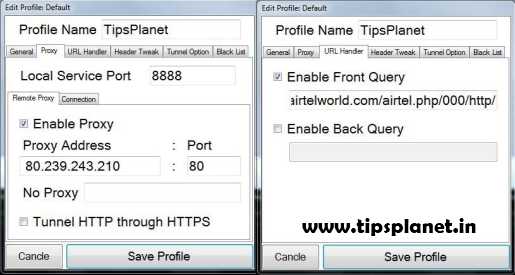
- Open VNAP Buster Go to Profile >> Edit and Configure it
- Under Proxy Set -
Click on Enable Proxy
Local Port : 8888 or 1234
Proxy Address : 80.239.243.210
Port : 80
- Under URL Handler Set -
Click on Enable Front Query
And Put -g.co/gms/m/wap.mauj.com.php/0A/http/
- Just save the config and connect.
- You can also select the Front Query from this List
1. Proxy : 78.46.189.92
Port : 80
APN :airtelgprs.com
Front Query: 203.115.112.5/cgi-bin/nph-blur.cgi/00/http/
2. Proxy :80.239.243.25
Port : 80
APN : airtelgprs.com
Front Query : d.airtelworld.com/airtel.php/000/http/
3. Proxy : 80.239.243.210
Port : 80
APN : airtelgprs.com
Front Query :
203.115.112.5/block.php/00/http/
Or
203.115.112.5/op.php/live.http/
Or
203.115.112.5/anonymizer/wap.xid/http/
Or
203.115.112.5/leelook.com/cgi-bin/nph-get/00000A/http/
Or
203.115.112.5/dev.php/live/http/
OR
203.115.112.5/webproxy.nph-proxy.cgi/00/http/
Or
203.115.112.5/s/nph-saraya.pl/010110A/http/
How to Configure FrontQuery Trick in Android Phones :
- Create New Configuration Setting in Android Phone using following data :
Account Name : TipsPlanet
Access Point Name : airtelgprs.com
Proxy Address : 80.239.243.210
Port : 80
- Download and Install Opera Mini Handler for Android [CLICK HERE TO DOWNLOAD]
- Launch Opera Mini Handler and Enter following FrontQuery in Front Query field :
FrontQuery : g.co/gms/m/wap.mauj.com.php/0A/http/
- Save Setting and Restart Opera Mini Handler. Enjoy Free Surfing !!!
Screenshots of VNAP Buster :
Also See :
- Idea UDP Trick With Torrent March 2013
- Airtel High Speed VPN Trick March 2013
- FREE Airtel Internet Trick For PC
If in case you are facing issue in setting up this trick, then do leave your message. And at last its better to try this Airtel VNAP net Buster trick on your own instead of asking. Like Us On Facebook and stay updated with latest tips and tricks.
Sunday, 3 March 2013
54
Sunday, 3 March 2013
read more
Airtel High Speed VPN Trick March 2013 - Working
Hey Friends! Today I am going to share all new Airtel High Speed VPN Trick March 2013 working all over the country except those states where TCP Port is blocked. As this is TCP Protocol based trick it is advised to always disconnect VPN after 100MB usage to avoid SIM block. Airtel High Speed VPN Trick can also be configured in Android Mobile via FeatVPN click here to know how?
Must See : Free BSNL 3G GPRS Trick March 2013
Before I start discussing about Vodafone VPN Trick, I want to tell you that you can read other tricks and hacks for other service providers like Idea, Reliance, Tata Docomo , Uninor and BSNL to check out click here.
Features of Airtel High Speed VPN Trick March 2013 :
How to Configure Airtel High Speed VPN Trick March 2013 :
How to Configure Airtel High Speed VPN Trick March 2013 in Android Phones :
To configure Airtel High Speed VPN Trick March 2013 on Android Mobile read posts : How to Use VPN Tricks on Android Phones
Screenshots for Airtel High Speen VPN Trick March 2013 :


Also See :
Must See : Free BSNL 3G GPRS Trick March 2013
Before I start discussing about Vodafone VPN Trick, I want to tell you that you can read other tricks and hacks for other service providers like Idea, Reliance, Tata Docomo , Uninor and BSNL to check out click here.
Features of Airtel High Speed VPN Trick March 2013 :
- Default APN : Airtel TCP VPN Trick March 2013 works on default Access Point Name(APN) : airtelgprs.com
- Full 3G Speed (See Screenshots)
- Based on TCP-443 Protocol
- Both HTTP and HTTPS Protocol Supported
- No Need of Any Data Pack or Balance
- Android Supported : Airtel TCP VPN Trick March 2013 can also be configured in Android Phones or Tablets via FeatVPN.
- Not Sure About Torrent (Check Yourself)
How to Configure Airtel High Speed VPN Trick March 2013 :
- Download and Install NMD VPN [CLICK HERE TO DOWNLOAD]
- Download Airtel High Speed VPN Configuration File [CLICK HERE TO DOWNLOAD]
- Paste the downloaded Airetl High Speed TCP VPN Configuration File in System Drive >> Program Files >> NMDVPN >> config
Windows 7 and Windows 8 Users RUN NMD VPN as the Administrator, if you are not doing this the NMD VPN will not be getting connected to the SERVERS.
- Establish Data Connection using airtelgprs.com as Access Point Name(APN)
- Activate Zero Rental 3G Plan ( To Activate Send SMS '3G' to 121)
- Select Network Vodafone instead of selecting Airtel ( To Select Vodafone Go to Network Selecting >> Select Manual >> Select Vodafone or Hutch)
How to Configure Airtel High Speed VPN Trick March 2013 in Android Phones :
To configure Airtel High Speed VPN Trick March 2013 on Android Mobile read posts : How to Use VPN Tricks on Android Phones
Screenshots for Airtel High Speen VPN Trick March 2013 :
 |
| Screenshot Updated On - 04/03/2013 |


Also See :
- Reliance 3G VPN Trick 2013 - Working
- Airtel VPN Trick Based On KEBRUM 2013 - Working
- Idea UDP Trick March 2013 With Torrent Support
Thursday, 28 February 2013
1
Thursday, 28 February 2013
read more
Airtel FrontQuery Trick Confirmed Working March 2013
Hey friends and readers of TipsPlanet, I got a very good response for 'Airtel FrontQuery Trick For Blocked SIM' which is working fine with 3G speed. Today I'm going to share a brand new Airtel FrontQuery Trick confirmed working in Maharastra and Gujrat. This trick is based on reversed http server and also supports resume download and parallel downloads.
Must See : Airtel High Speed VPN Trick March 2013 - WORKING

Advantages Of Airtel FrontQuery Trick :
How to Configure Airtel FrontQuery Trick :
Note : It only works with Opera Mini Handler 7.0
Also See :
Note : Download Link Updated!!! Tested on Nokia C5-00 (Symbian V3) in Maharashtra and Gujrat. This tricks only works on Symbian and JAVA Platform.
Like Us Facebook and stay updated with latest tips and tricks.
Must See : Airtel High Speed VPN Trick March 2013 - WORKING

Advantages Of Airtel FrontQuery Trick :
- Default APN : Works with default APN - airtelgprs.com
- Full 3G Speed and No Speed Capping
- Resume Download Support
- No Balance Deduction :D
How to Configure Airtel FrontQuery Trick :
Note : It only works with Opera Mini Handler 7.0
- Create New Configuration Settings in Phone with following input :
Access Point Name (APN) : airtelgprs.com
Proxy : 80.239.242.253 or 80.239.243.210
Port : 80
- Download and Install Opera Mini 7.0 Handler [CLICK HERE TO DOWNLOAD]
- Open Opera Mini Handler and Configure following :
FrontQuery : airtel.in/data/go.php/000000/http/
Proxy Type : Reverse HTTP
- Save the Setting and Enjoy Unlimited Free 3G Internet
Also See :
- Free BSNL 3G GPRS Trick March 2013
- Airtel VPNBook Trick Confirmed Working 2013
- FREE Unlimited 3G Internet On Aircel - Official Trick
Note : Download Link Updated!!! Tested on Nokia C5-00 (Symbian V3) in Maharashtra and Gujrat. This tricks only works on Symbian and JAVA Platform.
Like Us Facebook and stay updated with latest tips and tricks.
Wednesday, 27 February 2013
0
Wednesday, 27 February 2013
read more
Airtel VPNBook Trick Confirmed Working 2013
Hi friends, today I'm going to share Airtel VPNBook Configuration for FREE INTERNET which is 100% working in UP(East and West), Delhi can't say about other states. Its requested to all readers just give a try and hope this configuration works for you, If it works mention your state and speed you getting in commentbox. In this configuration several modification have been made in order to solve disconnection problem using finger. As this trick is based on VPNBook, so no registration required.
Must See : Airtel 3G TCP-443 VPN Trick March 2013 - Working
Before I start discussing about Airtel VPNBook Configuration Trick, I want to tell you that you can read other tricks and hacks for other service providers like Idea, Reliance, Tata Docomo , Uninor and BSNL to check out click here.
Advantages Of Airtel VPNBook Configuration :
How to Configure Airtel VPNBook Trick :
Unable to Complete Survey CLICK HERE TO KNOW HOW TO COMPLETE SURVEY AND DOWNLOAD FILES FROM FILEICE.NET?
Note : If you are using the NMD VPN for the first time then make sure you have the TAP drivers Installed


How to Configure Airtel VPNBook Configuration Trick on Android Phones :
To configure Airtel VPNBook Configuration Trick on Android Mobile read posts : How to Use VPN Tricks on Android Phones
Note : To avoid Data or Balance Loss always try @Low Balance. For 3G Speed recharge with lowest 3G Pack
Also See :
Must See : Airtel 3G TCP-443 VPN Trick March 2013 - Working
Before I start discussing about Airtel VPNBook Configuration Trick, I want to tell you that you can read other tricks and hacks for other service providers like Idea, Reliance, Tata Docomo , Uninor and BSNL to check out click here.
Advantages Of Airtel VPNBook Configuration :
- Default APN : Airtel VPNBook Trick works on default APN - airtelgprs.com
- Based on VPNBook
- Full 3G Speed (See Screenshot for Proof)
- Fast and Reliable Connection
- Disconnection Problem Solved
- Both HTTP and HTTPS Protocol supported
- Android Supported : This trick can be configured in Android Phone or Tablet via FeatVPN
How to Configure Airtel VPNBook Trick :
- Download and Install NMD VPN [CLICK HERE TO DOWNLOAD]
- Download Airtel VPNBook Configuration File [CLICK HERE TO DOWNLOAD]
Unable to Complete Survey CLICK HERE TO KNOW HOW TO COMPLETE SURVEY AND DOWNLOAD FILES FROM FILEICE.NET?
Note : If you are using the NMD VPN for the first time then make sure you have the TAP drivers Installed
- Paste Airtel VPNBook Configuration File in System Drive >> Program Files >> NMDVPN >> config
Windows 7 and Windows 8 Users RUN NMD VPN as the Administrator, if you are not doing this the NMD VPN will not be getting connected to the SERVERS.
- Connect with the downloaded configuration via NMDVPN.
- Use Access Point Name (APN) : airtelgprs.com


How to Configure Airtel VPNBook Configuration Trick on Android Phones :
To configure Airtel VPNBook Configuration Trick on Android Mobile read posts : How to Use VPN Tricks on Android Phones
Note : To avoid Data or Balance Loss always try @Low Balance. For 3G Speed recharge with lowest 3G Pack
Also See :
- Reliance 3G VPN Trick 2013 - Working
- Airtel VPN Trick Based On KEBRUM 2013 - Working
- Airtel Free Internet Trick February 2013
Monday, 25 February 2013
4
Monday, 25 February 2013
read more
Airtel 3G TCP-443 VPN Trick March 2013 - Working
Hello friends and loyal readers of TipsPlanet, It's party time Delhi user because today I am going to share a new Airtel 3G TCP-443 trick based on Kebrum. This trick is confirmed working in Delhi and other states where TCP Port in open. As this is TCP Protocol based trick it is advised to always disconnect VPN after certain usage to avoid SIM block. Airtel 3G TCP-443 trick can also be configured in Android Mobile via FeatVPN click here to know how? Also no disconnection issue with this trick if you use your Username and Password without sharing with your friends.
Must See : Airtel High Speed VPN Trick March 2013 - WORKING
Before I start discussing about Vodafone VPN Trick, I want to tell you that you can read other tricks and hacks for other service providers like Idea, Reliance, Tata Docomo , Uninor and BSNL to check out click here.
Features Of Airtel 3G TCP-443 VPN Trick March 2013 :
How to Configure Airtel 3G TCP-443 VPN Trick 2013 :
Unable to Complete Survey CLICK HERE TO KNOW HOW TO COMPLETE SURVEY AND DOWNLOAD FILES FROM FILEICE.NET?
Note : If you are using the NMD VPN for the first time then make sure you have the TAP drivers Installed
Screenshots :


How to Configure Airtel 3G TCP-443 VPN Trick on Android Phones :
To configure Airtel 3G TCP-443 VPN Trick on Android Mobile read posts : How to Use VPN Tricks on Android Phones
Also See :
If you face any issue in setting up Airtel 3G TCP-443 VPN Trick March 2013, leave comment I'll be happy to solve your issue. Like Us On Facebook and stay updated with latest tips and tricks.
Must See : Airtel High Speed VPN Trick March 2013 - WORKING
Before I start discussing about Vodafone VPN Trick, I want to tell you that you can read other tricks and hacks for other service providers like Idea, Reliance, Tata Docomo , Uninor and BSNL to check out click here.
Features Of Airtel 3G TCP-443 VPN Trick March 2013 :
- Default APN : Airtel 3G TCP-443 VPN Trick connects via default APN i.e., airtelgprs.com
- Based on TCP-443 protocol
- HTTP and HTTPS Protocol Supported : Many of the online users use the eCommerce websites Like eBay and other Secured websites which uses the HTTPS protocols are now supported under this Servers.
- Android Supported : Airtel 3G TCP-443 VPN Trick can also be configured in Android Phones or Tablets via FeatVPN.
- Full 3G Speed
- Torrents Supported
- No Balance Deduction
How to Configure Airtel 3G TCP-443 VPN Trick 2013 :
- Register for Free Account [CLICK HERE TO REGISTER]
- After Registration you will receive username and password in your email.
- Download and Install NMD VPN [CLICK HERE TO DOWNLOAD]
- Download Airtel 3G TCP-443 Configuration File [CLICK HERE TO DOWNLOAD]
- New Configuration Updated On 02-03-2013 Airtel TCP Configuration [CLICK HERE TO DOWNLOAD]
- Open Downloaded Configuration and Paste your Username and Password in pass.txt
Unable to Complete Survey CLICK HERE TO KNOW HOW TO COMPLETE SURVEY AND DOWNLOAD FILES FROM FILEICE.NET?
Note : If you are using the NMD VPN for the first time then make sure you have the TAP drivers Installed
- Paste complete Airtel 3G TCP-443 Configuration File in System Drive >> Program Files >> NMDVPN >> config
Windows 7 and Windows 8 Users RUN NMD VPN as the Administrator, if you are not doing this the NMD VPN will not be getting connected to the SERVERS.
- Connect with the downloaded configuration via NMDVPN.
- Use Access Point Name (APN) : airtelgprs.com
Screenshots :


How to Configure Airtel 3G TCP-443 VPN Trick on Android Phones :
To configure Airtel 3G TCP-443 VPN Trick on Android Mobile read posts : How to Use VPN Tricks on Android Phones
Also See :
- Reliance 3G VPN Trick 2013 - Working
- Airtel VPN Trick Based On KEBRUM 2013 - Working
- Airtel Free Internet Trick February 2013
If you face any issue in setting up Airtel 3G TCP-443 VPN Trick March 2013, leave comment I'll be happy to solve your issue. Like Us On Facebook and stay updated with latest tips and tricks.
Saturday, 23 February 2013
3
Saturday, 23 February 2013
read more
FREE Airtel Internet Trick for PC 2013
Hello friends and loyal readers of TipsPlanet, I got a very good response for previous Airtel VPN Trick 2013. Today I'm going to share a new Free Airtel Internet trick for PC, this trick gives enough speed for surfing not downloading. This trick is 100% working all over the country and tested by me.
Must See : Airtel High Speed VPN Trick March 2013 - WORKING
Before I start discussing about this trick I want to tell you that you can read other tricks and hacks for other service providers like Idea, Reliance, Tata Docomo , Uninor and BSNL to check out click here.
Now without wasting a single minute lets get back to the FREE Airtel Internet Trick. First of all I want to tell you that all the tricks on this blog are very easy to implement that is why you need not to worry.
STEPS FOR FREE AIRTEL INTERNET TRICK 2013 :
SCREENSHOTS :


Also See :
If you face any problem in setting up Free Airtel Internet Trick for PC drop your comment, I will be happy to help you. Like Us On Facebook and stay updated with latest tips and tricks.
Must See : Airtel High Speed VPN Trick March 2013 - WORKING
Before I start discussing about this trick I want to tell you that you can read other tricks and hacks for other service providers like Idea, Reliance, Tata Docomo , Uninor and BSNL to check out click here.
Now without wasting a single minute lets get back to the FREE Airtel Internet Trick. First of all I want to tell you that all the tricks on this blog are very easy to implement that is why you need not to worry.
STEPS FOR FREE AIRTEL INTERNET TRICK 2013 :
- First Register Account at Your Freedom Site [CLICK HERE TO REGISTER]
- Download and Install Client
- For Java Installed PC [CLICK HERE TO DOWNLOAD]
- For Non Java Installed PC [CLICK HERE TO DOWNLOAD]
- After Installation go to Configure >> Server Connection
Address : airtel.in/freezone OR airtel.in/data
Port : 80
- Go to Proxy Setting and input following data
Proxy Address : ems09.your-freedom.de
Port : 80
Connection Mode : HTTP
- In Account Information Tab Input Your Username and Password
- Save and Exit
- Start Connection and Wait for few Second
- Open Mozilla Firefox >> Tools >> Options >> Advance >> Network >> Manual proxy configuration and input following proxy
HTTP Proxy: 127.0.0.1
Port: 8080
- Downloading with IDM : For downloading files with IDM open IDM go to >> Downloads >> Options >> Proxy >> Check Use HTTP Proxy
Proxy Server Address: 127.0.0.1
Port: 8080
- Enjoy Free Surfing and Downloading :)
SCREENSHOTS :


Also See :
- Airtel High Speed TCP VPN Trick 2013 - Working
- How to Get 3G Speed Using 2G Packs in Airtel
- Airtel Free Internet Trick February 2013
If you face any problem in setting up Free Airtel Internet Trick for PC drop your comment, I will be happy to help you. Like Us On Facebook and stay updated with latest tips and tricks.
Thursday, 21 February 2013
0
Thursday, 21 February 2013
read more
Free Airtel 3G GPRS Using Bolt Browser 2013
Hello friends and loyal readers of TipsPlanet, I got very good response for the previous "Airtel VPN Trick Based On Kebrum" trick, which is being used by many of our readers nowadays.
Must See : Airtel FrontQuery Trick For Block SIM February 2013

Today I am going to share a new trick for Free Airtel GPRS using Bolt Browser. This free Airtel GPRS Trick 2013 works with Bolt Browser and supports live YouTube streaming on mobile and have lots of other features. Before I start discussing about this trick I want to tell you that you can read other tricks and hacks for other service providers like Idea, Reliance, Tata Docomo , Uninor and BSNL to check out click here.
Features of Free Airtel GPRS Using Bolt Browser :
How to Configure Free Airtel GPRS Trick :
Also See :
If you face any issue in setting up Free Airtel 3G GPRS Using Bolt Browser then drop your comment, I will be happy to solve your problem. Like Us On Facebook and stay updated with latest tips and tricks.
Must See : Airtel FrontQuery Trick For Block SIM February 2013

Today I am going to share a new trick for Free Airtel GPRS using Bolt Browser. This free Airtel GPRS Trick 2013 works with Bolt Browser and supports live YouTube streaming on mobile and have lots of other features. Before I start discussing about this trick I want to tell you that you can read other tricks and hacks for other service providers like Idea, Reliance, Tata Docomo , Uninor and BSNL to check out click here.
Features of Free Airtel GPRS Using Bolt Browser :
- Works in Both Blocked and Live SIM Card
- Default APN : This tricks works on default APN i.e., airtelgprs.com
- Full 3G Speed
- Video Streaming Supported
- Supported with all Java phones
- Both HTTP and HTTPS Protocol Supported
How to Configure Free Airtel GPRS Trick :
- Download and Install Bolt Browser [Click Here to Download]
- Create New Configuration Settings in Phone with following input :
Access Point Name (APN): airtelgprs.com
Proxy Address : 174.120.204.251
Port : 80
- Now Open Bolt Browser and move to settings and select HTTP as proxy type
- And in Proxy Server Address enter any free IP or working Homepage of your region
- Save the Setting and Restart Bolt Browser. Enjoy free unlimited browsing :)
Also See :
- Airtel High Speed TCP VPN Trick 2013 - Working
- How to Get 3G Speed Using 2G Packs in Airtel
- Airtel Free Internet Trick February 2013
If you face any issue in setting up Free Airtel 3G GPRS Using Bolt Browser then drop your comment, I will be happy to solve your problem. Like Us On Facebook and stay updated with latest tips and tricks.
Subscribe to:
Posts (Atom)


