
Showing posts with label Blogging. Show all posts
Showing posts with label Blogging. Show all posts
Thursday, 2 January 2014
0
Thursday, 2 January 2014
read more
Top 10 Traffic Techniques for 2014
As a website or blog owner, without traffic you will not survive!
There are numerous ways both online and offline, to draw traffic to your website. Some ways are of course, more effective than others. Some techniques have improved over the years and some have become obsolete.
Must See: 5 Strategies for Search Engine Optimization
With the average conversion rate of ecommerce sites being about 3%, you will need a lot of traffic to become successful. Of course, everyone's idea of success is different. One webmaster might strive for 100 visitors a day while others might need 10,000 to make their business work. Whatever your goal number may be, you cannot escape the need for traffic.

As this is year 2014, we need to employ the most effective methods available to reach our goal traffic number. Below are some of the best techniques available online to bring forth that traffic we need for our internet business survival!
1. Social Media - Since social media has exploded onto the worldwide web, the flames have gotten hotter and hotter. To be successful with social media marketing, you need to participate consistently. This cannot be a now and then project. You must commit fully to your social media campaign. Be sure to fill out your profiles completely. I see so many people with blank profile pages. This will not propel your marketing efforts.
Facebook - The most visited social media page. Be sure to get involved and do what you can do engage your followers and friends.
Twitter - Connect with your followers. Respond to them and address them regularly. Don't just tweet ads and sales pitches.
Pinterest - Pinterest is a very visual social site so be sure to use effective images and photos.
Google+ - Take advantage of all the great features provided!
2. Content Marketing - Write informative articles and use them as guest posts on blogs, submit them to Ezine publishers and prominent business or other appropriate websites. People pay attention to good content and it will bring those people to your site.
3. Blog Commenting - Post relevant comments with substance. Don't just type in "Me too" or "I agree". Add facts, resources, etc. to get more people to become interested in what you have to say. When people pay attention to what you say and become interested, they will also become interested in you and your business.
4. Search Engines - Search engines are always changing. What worked last year might not work this year so keep up with the search engines and make any necessary adjustments to your website. Keep in mind that no matter the changes, good content will always bring results. Update your content regularly and keep your site fresh!
5. Newsletter - Publishing a newsletter is still a powerful way to get traffic and increase sales. Make your newsletter interactive and build a foundation with your readers. Feature a FAQ section or offer a weekly contest. Add some fun and personality to your newsletter but do not add anything inappropriate or offensive.
6. Blogging - If you still do not have a blog, you should definitely consider adding a blog to your marketing agenda. Blogs are more likely to place high in the search engines. An active, content-filled blog will bring you a ton of traffic.
7. Podcasting - A podcast is simply a digital file made available for download to numerous devices. Podcasting is becoming very popular and can do a lot for your traffic numbers. Create a podcast that deals with your business niche. Add your website link several times to get people to visit your site.
8. Mobile Marketing - More and more people are going mobile with the internet. You have to keep up and be sure your website is mobile-friendly. Gear your marketing towards mobile users. The need for mobile marketing will dramatically increase in 2014!
9. Interviews - Interviewing an expert in your field could bring you a lot of free traffic. If this person is well-known and respected, many people will be searching for this person and your website will become more popular.
10. Video Marketing - People are visual creatures. Our brains process visual information much more efficiently then plain text. 90% of online shoppers say that watching a video will influence their decision to buy. If you have not yet started dabbling in video marketing, then 2014 is the year to get started!
Some of the older marketing methods such as safelists, free classifieds, banner advertising, webrings and mass email (spam) marketing are just not very effective and some could even result in problems for you.
Keep an eye on new marketing trends to ensure you are taking advantage of the best marketing tactics available to bring the most traffic to your site. Much success to you!
Also See:
Source: [Ezine]
There are numerous ways both online and offline, to draw traffic to your website. Some ways are of course, more effective than others. Some techniques have improved over the years and some have become obsolete.
Must See: 5 Strategies for Search Engine Optimization
With the average conversion rate of ecommerce sites being about 3%, you will need a lot of traffic to become successful. Of course, everyone's idea of success is different. One webmaster might strive for 100 visitors a day while others might need 10,000 to make their business work. Whatever your goal number may be, you cannot escape the need for traffic.
As this is year 2014, we need to employ the most effective methods available to reach our goal traffic number. Below are some of the best techniques available online to bring forth that traffic we need for our internet business survival!
1. Social Media - Since social media has exploded onto the worldwide web, the flames have gotten hotter and hotter. To be successful with social media marketing, you need to participate consistently. This cannot be a now and then project. You must commit fully to your social media campaign. Be sure to fill out your profiles completely. I see so many people with blank profile pages. This will not propel your marketing efforts.
Facebook - The most visited social media page. Be sure to get involved and do what you can do engage your followers and friends.
Twitter - Connect with your followers. Respond to them and address them regularly. Don't just tweet ads and sales pitches.
Pinterest - Pinterest is a very visual social site so be sure to use effective images and photos.
Google+ - Take advantage of all the great features provided!
2. Content Marketing - Write informative articles and use them as guest posts on blogs, submit them to Ezine publishers and prominent business or other appropriate websites. People pay attention to good content and it will bring those people to your site.
3. Blog Commenting - Post relevant comments with substance. Don't just type in "Me too" or "I agree". Add facts, resources, etc. to get more people to become interested in what you have to say. When people pay attention to what you say and become interested, they will also become interested in you and your business.
4. Search Engines - Search engines are always changing. What worked last year might not work this year so keep up with the search engines and make any necessary adjustments to your website. Keep in mind that no matter the changes, good content will always bring results. Update your content regularly and keep your site fresh!
5. Newsletter - Publishing a newsletter is still a powerful way to get traffic and increase sales. Make your newsletter interactive and build a foundation with your readers. Feature a FAQ section or offer a weekly contest. Add some fun and personality to your newsletter but do not add anything inappropriate or offensive.
6. Blogging - If you still do not have a blog, you should definitely consider adding a blog to your marketing agenda. Blogs are more likely to place high in the search engines. An active, content-filled blog will bring you a ton of traffic.
7. Podcasting - A podcast is simply a digital file made available for download to numerous devices. Podcasting is becoming very popular and can do a lot for your traffic numbers. Create a podcast that deals with your business niche. Add your website link several times to get people to visit your site.
8. Mobile Marketing - More and more people are going mobile with the internet. You have to keep up and be sure your website is mobile-friendly. Gear your marketing towards mobile users. The need for mobile marketing will dramatically increase in 2014!
9. Interviews - Interviewing an expert in your field could bring you a lot of free traffic. If this person is well-known and respected, many people will be searching for this person and your website will become more popular.
10. Video Marketing - People are visual creatures. Our brains process visual information much more efficiently then plain text. 90% of online shoppers say that watching a video will influence their decision to buy. If you have not yet started dabbling in video marketing, then 2014 is the year to get started!
Some of the older marketing methods such as safelists, free classifieds, banner advertising, webrings and mass email (spam) marketing are just not very effective and some could even result in problems for you.
Keep an eye on new marketing trends to ensure you are taking advantage of the best marketing tactics available to bring the most traffic to your site. Much success to you!
Also See:
- How to Increase Your Organic and Social Media Visitors
- 5 Wordpress Plugins to Increase Blog Traffic
- 10 Steps to Successful Blogging
Source: [Ezine]
Sunday, 30 June 2013
0
Sunday, 30 June 2013
read more
5 Don'ts SEO Tips for Bloggers
There are may Search Engine Optimization(SEO) tips that you can follow to boost your blog traffic and ranking is SERPs. Also there are specific things you need to avoid content gets the traffic and ranking it deserves. Let's take a look at Top 5 Dont's SEO Tips.

1. Keyword Stuffing
Keyword Stuffing is considered to be an unethical search engine optimization (SEO) technique, which leads to banning a website from major search engines either temporarily or permanently. Keyword stuffing occurs when a web page is loaded with keywords in the meta tags or in content of a web page. The repetition of words in meta tags may explain why many search engines no longer use these tags.
Keyword stuffing had been used in the past to obtain top search engine rankings and visibility for particular phrases. This method is completely outdated and adds no value to rankings today. In particular, Google no longer gives good rankings to pages employing this technique.
2. Hidden Keywords and Hidden Texts
When it comes to search engine optimization, you can't hide from the search engine spiders. Hidden text is not visible to the human eye, yet is still readable by search engine spiders. Webmasters mistakenly believe they can stuff their keywords and keyword phrases in the hidden text to increase their keyword density and improve their rankings - without the search engine spiders ever detecting it.
Search engines won't tolerate unethical search engine optimization practices and will penalize sites that adopt such tactics. Rather than wasting your time and energy with spam tactics, focus your efforts on creating a site that employs ethical search engine optimization strategies, including keyword-rich content, linking campaigns, and effective website usability.
Google Says "Hiding text or links in your content to manipulate Google’s search rankings can be seen as deceptive and is a violation of Google’s Webmaster Guidelines."
3. Duplicate Content
Duplicate content is a term used to describe content that appears on more than one web page in the field of search engine optimization. When there are multiple pieces of identical content on the Internet, it is difficult for search engines to decide which version is more relevant to a given search query. Search engines such as Google can penalize or cease displaying that site in any relevant search results.
4. No Original Content
Avoid publishing content on your blog that includes a page filled with tonnes of ads or links with little or no original content. That's a big spam flag for search engines and search engine cease displaying that page in any relevant search results.
5. Publishing Paid Links or Paying for Links
Your site's search results ranking is partly based on analysis of those sites that link to you. The quality, quantity, and relevance of links influences your ranking. The sites that link to you can provide context about the subject matter of your site, and can indicate its quality and popularity.
When people pay for links, it artificially influence their popularity in search engines. In an effort to crack down on paid links and reduce this artificial popularity influence, sites that pay for links and sites that publish links that have been paid for could be punished if they're caught.
What Google Says About Link Schemes?
"Any links intended to manipulate a site's ranking in Google search results may be considered part of a link scheme. This includes any behavior that manipulates links to your site, or outgoing links from your site. Manipulating these links may affect the quality of our search results, and as such is a violation of Google’s Webmaster Guidelines."
Like Us On Facebook and stay updated with latest tips and tricks.

1. Keyword Stuffing
Keyword Stuffing is considered to be an unethical search engine optimization (SEO) technique, which leads to banning a website from major search engines either temporarily or permanently. Keyword stuffing occurs when a web page is loaded with keywords in the meta tags or in content of a web page. The repetition of words in meta tags may explain why many search engines no longer use these tags.
Keyword stuffing had been used in the past to obtain top search engine rankings and visibility for particular phrases. This method is completely outdated and adds no value to rankings today. In particular, Google no longer gives good rankings to pages employing this technique.
2. Hidden Keywords and Hidden Texts
When it comes to search engine optimization, you can't hide from the search engine spiders. Hidden text is not visible to the human eye, yet is still readable by search engine spiders. Webmasters mistakenly believe they can stuff their keywords and keyword phrases in the hidden text to increase their keyword density and improve their rankings - without the search engine spiders ever detecting it.
Search engines won't tolerate unethical search engine optimization practices and will penalize sites that adopt such tactics. Rather than wasting your time and energy with spam tactics, focus your efforts on creating a site that employs ethical search engine optimization strategies, including keyword-rich content, linking campaigns, and effective website usability.
Google Says "Hiding text or links in your content to manipulate Google’s search rankings can be seen as deceptive and is a violation of Google’s Webmaster Guidelines."
3. Duplicate Content
Duplicate content is a term used to describe content that appears on more than one web page in the field of search engine optimization. When there are multiple pieces of identical content on the Internet, it is difficult for search engines to decide which version is more relevant to a given search query. Search engines such as Google can penalize or cease displaying that site in any relevant search results.
4. No Original Content
Avoid publishing content on your blog that includes a page filled with tonnes of ads or links with little or no original content. That's a big spam flag for search engines and search engine cease displaying that page in any relevant search results.
5. Publishing Paid Links or Paying for Links
Your site's search results ranking is partly based on analysis of those sites that link to you. The quality, quantity, and relevance of links influences your ranking. The sites that link to you can provide context about the subject matter of your site, and can indicate its quality and popularity.
When people pay for links, it artificially influence their popularity in search engines. In an effort to crack down on paid links and reduce this artificial popularity influence, sites that pay for links and sites that publish links that have been paid for could be punished if they're caught.
What Google Says About Link Schemes?
"Any links intended to manipulate a site's ranking in Google search results may be considered part of a link scheme. This includes any behavior that manipulates links to your site, or outgoing links from your site. Manipulating these links may affect the quality of our search results, and as such is a violation of Google’s Webmaster Guidelines."
Like Us On Facebook and stay updated with latest tips and tricks.
Saturday, 1 June 2013
0
Saturday, 1 June 2013
read more
How to Increase Your Organic and Social Media Visitors
Website traffic is the best way to monitor your website performance, it tells you how your website is performing on internet. We could partly measure the success of a website through the average amount of visitors that your website is receiving on a monthly, weekly and daily basis. This is additionally the most effective way to puzzle out if your promoting strategy is effective and giving your web site the most effective results.

We all understand that to increase our organic visitors, we should often conduct totally different off-page and on-page techniques for our web site to assist search engine index our pages that will drive massive traffic. We should focus on the following on page optimization to properly help our web site stand out in Search Engine Results Page(SERP).
To easily understand what the four strategies mentioned above, a photograph of a sample SERP is attached on this post.
Remember that if your web site doesn’t seem within the first page of SERPs, the possibilities that your organic visitors can increase is unquestionably bitty. However, if you conduct a method to assist a website receive juice from different domains, you can undoubtedly stand go into your competitors and therefore the possibilities that your web site can seem in first page can get higher. You should focus on non-traditional ways to help your website gain its authority online by doing :
By using the above mentioned strategies will help you acquiring high quality links from reputed websites, this will surely increase your SERP position and increase your organic visitors.
On other hand, we should pay attention to get visitors from Social Media. Internet marketers are aware that social media promotions can positively help a web site to become popular and obtain famed by many folks at intervals your targeted niche. Websites like Twitter, Facebook, LinkedIn and Google+ are very common and popular for many individuals everywhere the world so no business is in a position to miss the opportunities that they'll give. Traffic from social media web sites typically takes time to totally develop and not everybody are going to be interested to go and visit your website simply because you're all connected on social media. There are few ways that you must apply to boost the social media traffic coming to your website.
Having sufficient and enough number of organic and referral visitors will decide how your website is performing in terms of popularity.
Also See :
Any doubt, feel free to ask. Likes Us On Facebook to stay updated with latest tips and tricks.
We all understand that to increase our organic visitors, we should often conduct totally different off-page and on-page techniques for our web site to assist search engine index our pages that will drive massive traffic. We should focus on the following on page optimization to properly help our web site stand out in Search Engine Results Page(SERP).
- Title Optimization : The page title is what is displayed in the title bar of your browser window. This is the one place on a web page where your keywords MUST be present. Correct use of keywords in the title of every page of your website is extremely important to Google. "The title shouldn't consist of much more than about 9 words or 60 characters, with your keywords used at the very beginning of the title."
- Keywords Placement : Once you choose keywords that are related to your website, there are a variety of ways that you can use your keyword list strategically to generate traffic. The actual placement of your keyword phrases on your web pages is important. This will help your pages to easily get discovered by search engines.
- URL Rewriting : Rewriting your URL is the best way to tell search engines what your specific page on your web site is that specialize in. For instance, if a page on your web site is that specialize in seo guidelines, its URL should be domain.com/seo-guidelines.
- Internal Links : Internal links are links that go from one page on a domain to a different page on the same domain. They are commonly used in main navigation. These type of links are useful for reasons, they allow visitors to navigate a website and establish information hierarchy for the given website.
To easily understand what the four strategies mentioned above, a photograph of a sample SERP is attached on this post.
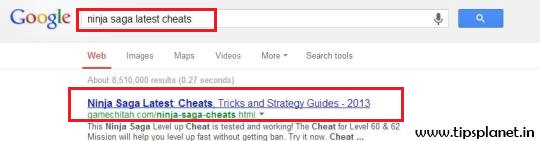
Remember that if your web site doesn’t seem within the first page of SERPs, the possibilities that your organic visitors can increase is unquestionably bitty. However, if you conduct a method to assist a website receive juice from different domains, you can undoubtedly stand go into your competitors and therefore the possibilities that your web site can seem in first page can get higher. You should focus on non-traditional ways to help your website gain its authority online by doing :
- Guest Posting
- Content Marketing
By using the above mentioned strategies will help you acquiring high quality links from reputed websites, this will surely increase your SERP position and increase your organic visitors.
On other hand, we should pay attention to get visitors from Social Media. Internet marketers are aware that social media promotions can positively help a web site to become popular and obtain famed by many folks at intervals your targeted niche. Websites like Twitter, Facebook, LinkedIn and Google+ are very common and popular for many individuals everywhere the world so no business is in a position to miss the opportunities that they'll give. Traffic from social media web sites typically takes time to totally develop and not everybody are going to be interested to go and visit your website simply because you're all connected on social media. There are few ways that you must apply to boost the social media traffic coming to your website.
- Find your target visitors
- Engage in the community
Having sufficient and enough number of organic and referral visitors will decide how your website is performing in terms of popularity.
Also See :
- 5 Ways to Boost Website Traffic
- How and Why Should I Start Building Backlinks?
- 5 Wordpress Plugin to Increase Blog Traffic
Any doubt, feel free to ask. Likes Us On Facebook to stay updated with latest tips and tricks.
Tuesday, 9 April 2013
0
Tuesday, 9 April 2013
read more
Keyword Selection For Search Engine Optimization : SEO
Choosing your primary keywords may be one of the most difficult parts of good SEO. It is also one of the most important element of SEO. When you begin optimizing your website for search engines, you will need to choose one primary keyword or keyword phrase, and four to six secondary keywords.

These keywords are going to be essential later on. You won't just use them for a single page on your website. Instead, they should feature prominently on each page of your website, in any website-related blogs, in any website-related newsletters, and in any website-related press releases.
With that in mind, look for keywords that will stand the test of time. Avoid keywords that are too general; you want targeted keywords for targeted traffic. But don't swerve to the opposite extreme; a keyword is no good if it's something so specific that no one would ever search for it.
Your secondary keywords can be a little more flexible than your primary keyword or keyword phrase. Pick the words people are most likely to use when searching for your product or information. You should ideally have between four and six secondary keywords, but if necessary, pick as many as ten. Don't go above ten, as too many keywords end up diluting the importance of any of your keywords.
Look for a blend of general and specific secondary keywords. Better yet, make one or two of them keyphrases, such as "handcrafted knit scarves" that blend the specifics of the three words together with the generalness of each individual word.
Once you have your keywords, don't limit them to just your website. Use your primary keyword phrase every time you link to your website, in blogs, in newsletters, and in RSS feeds. Don't overlook relevant forum signatures! The right keywords, used in the right way, can be invaluable.
Like Us On Facebook and stay updated with latest tips and tricks.

These keywords are going to be essential later on. You won't just use them for a single page on your website. Instead, they should feature prominently on each page of your website, in any website-related blogs, in any website-related newsletters, and in any website-related press releases.
With that in mind, look for keywords that will stand the test of time. Avoid keywords that are too general; you want targeted keywords for targeted traffic. But don't swerve to the opposite extreme; a keyword is no good if it's something so specific that no one would ever search for it.
Your secondary keywords can be a little more flexible than your primary keyword or keyword phrase. Pick the words people are most likely to use when searching for your product or information. You should ideally have between four and six secondary keywords, but if necessary, pick as many as ten. Don't go above ten, as too many keywords end up diluting the importance of any of your keywords.
Look for a blend of general and specific secondary keywords. Better yet, make one or two of them keyphrases, such as "handcrafted knit scarves" that blend the specifics of the three words together with the generalness of each individual word.
Once you have your keywords, don't limit them to just your website. Use your primary keyword phrase every time you link to your website, in blogs, in newsletters, and in RSS feeds. Don't overlook relevant forum signatures! The right keywords, used in the right way, can be invaluable.
Like Us On Facebook and stay updated with latest tips and tricks.
Wednesday, 20 March 2013
0
Wednesday, 20 March 2013
read more
5 Ways To Boost Website Traffic
Getting traffic is one of the most important tasks for any web master. There are several methods available out there to boost website traffic and should be given all credit. Once you have understood these SEO strategies, it will boost your traffic. If you can't afford spending time, you will have to go the other way around and spend money. For the first situation, here is what you can do. Here come's 5 free ways to boost website traffic :

1. Exchange Links
With the link exchange method you get to swap links with other relevant websites, and this comes with two advantages: you get more traffic and you get a better search engine ranking. When search engines find your site to be connected to other good ones, it places more emphasis on it. Inbound links should come only from high-quality websites, otherwise they are useless. Also, you may want to work on your link titles to make them enticing.
2. Submit Articles to Directories
You can search online for free articles directories and start to market your site through articles. Website owners are constantly in search of quality articles to include in their content or newsletters. You may let them use your articles, given that they include your site's link at the end. It is a method that guarantees increased traffic.
3. Freebies and Subscriptions
Viewers tend to stay around when you offer them something for free. Such incentive will also encourage them to sign up for receiving a newsletter. Freebies could consist of articles, too - articles which you allow to be used by others along with your link. Also, when a visitor finds, at least, one interesting piece of content on your site, they may want to subscribe. You will then have their email address and send them periodic newsletters. A subscriber is much more likely to return to your website.
4. Remarkable Content
When your content is remarkable, it truly makes an impact. Google doesn't like repetitive things, nor does it fancy stuffing keywords. It may sound simple, but it is not that easy to be interesting. You need to find your niche, to get to what exactly is of interest to a specific audience. Don't try to please everyone, just strive to captivate a certain category. In addition, you can use blogs in your niche to post comments on them and thus place links to your own content to draw visitors in.
5. Keywords and Being Specific
SEO strategies prompt you to insert keywords relevant to your niche in all the appropriate fields, not just the basic content. If you make a blog comment, you can place one or two keywords there. Not sure how to do that? Find extensive documentation or hire a professional to optimize your site.
Also See :
Have Problem in understanding SEO? Drop Comment. Like Us On Facebook and stay updated with latest tips and tricks.

1. Exchange Links
With the link exchange method you get to swap links with other relevant websites, and this comes with two advantages: you get more traffic and you get a better search engine ranking. When search engines find your site to be connected to other good ones, it places more emphasis on it. Inbound links should come only from high-quality websites, otherwise they are useless. Also, you may want to work on your link titles to make them enticing.
2. Submit Articles to Directories
You can search online for free articles directories and start to market your site through articles. Website owners are constantly in search of quality articles to include in their content or newsletters. You may let them use your articles, given that they include your site's link at the end. It is a method that guarantees increased traffic.
3. Freebies and Subscriptions
Viewers tend to stay around when you offer them something for free. Such incentive will also encourage them to sign up for receiving a newsletter. Freebies could consist of articles, too - articles which you allow to be used by others along with your link. Also, when a visitor finds, at least, one interesting piece of content on your site, they may want to subscribe. You will then have their email address and send them periodic newsletters. A subscriber is much more likely to return to your website.
4. Remarkable Content
When your content is remarkable, it truly makes an impact. Google doesn't like repetitive things, nor does it fancy stuffing keywords. It may sound simple, but it is not that easy to be interesting. You need to find your niche, to get to what exactly is of interest to a specific audience. Don't try to please everyone, just strive to captivate a certain category. In addition, you can use blogs in your niche to post comments on them and thus place links to your own content to draw visitors in.
5. Keywords and Being Specific
SEO strategies prompt you to insert keywords relevant to your niche in all the appropriate fields, not just the basic content. If you make a blog comment, you can place one or two keywords there. Not sure how to do that? Find extensive documentation or hire a professional to optimize your site.
Also See :
- 10 Tips To Increase Blog Traffic
- How and Why Should I Start Building Backlinks?
- 5 Wordpress Plugin to Increase Blog Traffic
Have Problem in understanding SEO? Drop Comment. Like Us On Facebook and stay updated with latest tips and tricks.
Saturday, 9 March 2013
0
Saturday, 9 March 2013
read more
5 Wordpress Plugins to Increase Blog Traffic
Getting traffic is one of the most important tasks for any web master. There are many ways to directly increase traffic to your blog, but there are even more indirect ways to give your blog traffic a significant boost. Using the Wordpress plugins listed below you can increase your traffic up to the mark, all these Wordpress pluging are free. All these Wordpress plugins helps you getting traffic from search engine, social networking and social bookmarking. Here is Top 5 Wordpress Plugins to Increase blog traffic :

1. SEO Title Tag
Title tags are arguably the most important of the on-page factors for search engine optimization(SEO). SEO Title Tag makes is dead-easy to optimize the title tags across your WordPress-powered blog or website. SEO Title Tag allows you to override a page's or a post's title tag with a custom one. Also this plugin helps you to use keywords in your title tags which drives organic traffic your blog.
Install SEO Title Tag : [CLICK HERE TO INSTALL]
2. All in One SEO Pack
All in One SEO Pack plugin to automatically optimize your WordPress blog for Search Engines. It allows you to add title tags, descriptions, keywords and more to every page and post published on your blog. It also optimizes you title tags for search engine and generates META Tag automatically.
Install All in SEO Pack : [CLICK HERE TO INSTALL]
3. Google XML Sitemaps
Google XML Sitemap plugin will generate a special XML sitemap which will help search engines like Google, Bing, Yahoo and Ask.com to better index your blog. With such a sitemap, it's much easier for the crawlers to see the complete structure of your site and retrieve it more efficiently. The plugin supports all kinds of WordPress generated pages as well as custom URLs. This plugin is particularly helpful for blogs that want to get indexed by search engines quickly.
Install Google XML Sitemaps : [CLICK HERE TO INSTALL]
4. Sharebar
Sharebar is a dynamic and fully customizable WordPress plugin to boost your blog traffic, It adds a Sharebar on the left of a blog post that contains links/buttons to popular social networking sites. Which allows your readers to share your posts on social networking site like Facebook, Twitter, Google+ etc. It helps you get more traffic social networking sites.
Install Sharebar : [CLICK HERE TO INSTALL]
5. WP-Email
The WP-Email plugin is a must-have. When you install this plugin, a message and link is included at the end of every post enabling visitors to send posts they like to friends via email with a single mouse click. Allowing readers to introduce other people to your blog through emailed posts is a great way to pick up some new visitors.
Install WP-Email : [CLICK HERE TO INSTALL]
Like Us On Facebook and stay updated with latest tips and trick.

1. SEO Title Tag
Title tags are arguably the most important of the on-page factors for search engine optimization(SEO). SEO Title Tag makes is dead-easy to optimize the title tags across your WordPress-powered blog or website. SEO Title Tag allows you to override a page's or a post's title tag with a custom one. Also this plugin helps you to use keywords in your title tags which drives organic traffic your blog.
Install SEO Title Tag : [CLICK HERE TO INSTALL]
2. All in One SEO Pack
All in One SEO Pack plugin to automatically optimize your WordPress blog for Search Engines. It allows you to add title tags, descriptions, keywords and more to every page and post published on your blog. It also optimizes you title tags for search engine and generates META Tag automatically.
Install All in SEO Pack : [CLICK HERE TO INSTALL]
3. Google XML Sitemaps
Google XML Sitemap plugin will generate a special XML sitemap which will help search engines like Google, Bing, Yahoo and Ask.com to better index your blog. With such a sitemap, it's much easier for the crawlers to see the complete structure of your site and retrieve it more efficiently. The plugin supports all kinds of WordPress generated pages as well as custom URLs. This plugin is particularly helpful for blogs that want to get indexed by search engines quickly.
Install Google XML Sitemaps : [CLICK HERE TO INSTALL]
4. Sharebar
Sharebar is a dynamic and fully customizable WordPress plugin to boost your blog traffic, It adds a Sharebar on the left of a blog post that contains links/buttons to popular social networking sites. Which allows your readers to share your posts on social networking site like Facebook, Twitter, Google+ etc. It helps you get more traffic social networking sites.
Install Sharebar : [CLICK HERE TO INSTALL]
5. WP-Email
The WP-Email plugin is a must-have. When you install this plugin, a message and link is included at the end of every post enabling visitors to send posts they like to friends via email with a single mouse click. Allowing readers to introduce other people to your blog through emailed posts is a great way to pick up some new visitors.
Install WP-Email : [CLICK HERE TO INSTALL]
Like Us On Facebook and stay updated with latest tips and trick.
Wednesday, 6 March 2013
0
Wednesday, 6 March 2013
read more
How to Schedule Post In Blogger
Blogger is the most used blogging platform, this is the reason why it has awesome features. But most of the users are unvaried from lot of it's features. And scheduling a post is another feature which seems to be pretty much hidden from most of the blogger users. Scheduling your posts can be useful if you have written your post on some upcoming topic but your not in a mood to post right away, well at that time you can schedule that post to be posted at any time on any future date.
Why Scheduling is Important?
Timing matters, not only for SEO (Search Engine optimization) but also for your Alexa Ranking. It is crucial that every day you publish your posts at accurate timing. This not only improves your Alexa Ranking but also has some significance in SEO. And Blogger Scheduling feature allows you to do that, you can easily plan timing of your future posts by scheduling them. You can use this feature to schedule your post when you are busy. And on the other hand publishing your post at accurate timing allows the crawling bots to crawl the most out of your blog.
How to Schedule Post in Blogger :
Like Us On Facebook and stay updated with latest tips and tricks.
Why Scheduling is Important?
Timing matters, not only for SEO (Search Engine optimization) but also for your Alexa Ranking. It is crucial that every day you publish your posts at accurate timing. This not only improves your Alexa Ranking but also has some significance in SEO. And Blogger Scheduling feature allows you to do that, you can easily plan timing of your future posts by scheduling them. You can use this feature to schedule your post when you are busy. And on the other hand publishing your post at accurate timing allows the crawling bots to crawl the most out of your blog.
How to Schedule Post in Blogger :
- Open Blogger.com >> Your Blog >> New Post
- Now after your have written your post you can see the Schedule option on the right.
- When you will click on the Schedule option, you will be able to see two options i.e. Automatic and Set date and time. Automatic means the current time your are posting so if its chosen then your post will be posted at the current time.
- Now to Schedule your post select "Set date and time"
- After selecting "Set Date and time" a calendar would pop out. Now just set date and time of your post. And press Done
- Now press Publish and your post will only get published as soon as that date and time has arrived.

Must See : How to Recover Deleted Post in Blogger
Like Us On Facebook and stay updated with latest tips and tricks.
Tuesday, 5 March 2013
0
Tuesday, 5 March 2013
read more
10 Steps to Successful Blogging
Blogs can be a very marketable and very profitable tool if used correctly. Profiting from blogs is just a matter of grabbing the attention of an audience and not doing any actual salesmen selling. In this article you will learn the 10 most essential steps to successful blogging.

1. Where to Start?
You should begin your blog with a free blog hosting service such as Blogger, Wordpress, Journal Home etc. Starting with a free blog hosting service allows you to begin blogging instantly without having any advance knowledge of scripts, hosting, or programming language. It allows you to build an audience and buzz for your blog. It allows you to focus on your content and not the internal maintenance of the blog. The best benefit of starting with a free service, is in the case your blog doesn't become successful you do not lose any money or are you left holding the bill. The great thing about a blog is that they are organized in chronological order, your latest entry is displayed first. When your blog traffic grows greatly and you are ready to upgrade to your own domain, means you can setup your top level domain.
2. Niche
A niche is a targeted product, service, or topic. You should first decide on a product, service, or topic which interest you. Choose an area which you can enthusiastically write about on a daily basis. You can use keyword research services like Google Keyword Tool or Yahoo! Buzz Index to find popular searched topics. It does NOT matter if your topic is popular as long as there is a audience for your topic and the topic is precisely focused then your blog should be successful. Anything can be considered a niche as long as it has a target audience no matter how large or how small the audience is.
3. Update Daily
This step is a must and not a suggestion. Updating your blog daily not only keeps your blog more interesting to readers, but it also gives your blog fresh content on a day to day making it more appealing to search engines. Not updating your blog on an occasional holiday or one day here and there is understandable to most, but missing days at a time or weeks is unacceptable and will most likely result in your blog being unsuccessful. To keep your blog traffic and retain your visitors interest it is a must to update your blog daily with multiple entries. Until you have a steady audience you should try to update your blog everyday with at least 3 or more daily entries. The best way to accomplish this is to set aside 1-2 hours a day for tending to your blog and adding new entries. It may even be wise to schedule a set time which you dedicate to your blog each day.
4. Traffic
It's no secret. You must have traffic to profit from blogs. There are numerous ways to build traffic. Paid advertising, free advertising, viral marketing, search engine marketing, RSS/XML feeds, and word-of-mouth. You should submit your blog URL address to search engines and blog directories. You should submit your RSS/XML URL feed to blog ping services like Technorati, Ping-O-Matic, and Blogdigger. You should try to write at least 1 full length article every week for syndication and submit your article to at least 10 article syndicators.
Also See : 5 Ways to Get Free Traffic
5. Track Your Blog
How do you know if your blog has traffic? Just because no one is leaving comments doesn't mean your blog isn't growing. Many visitors do not leave comments but they are returning visitors. I know it sounds crazy but with blogs people are more interested in what "you" have to say! Many visitors do not comment their 1st, 2nd, or 3rd time. Some do not comment at all, but are active daily visitors.
Tracking your blog does not have to be overly sophisticated usually a simple free page counter like StatCounter.com or Active Meter or Google Analytics will do the trick. Install (copy/paste) the code into the html of your blog template and start tracking your visitors. Its better to use a service which gives you advanced traffic analysis, such as keyword tracking information, referral information, and search engine information. Visitors, returning visitors, and unique visitors should be standard for any page counter service you choose.
6. Social Media
Install social media sharing widgets and buttons to your blog, this will help your readers share your content with their friends and fans, thus bringing in more traffic and loyal readers, people love to share only content they like.
7. Listen To Your Audience
When using the proper page counter you should begin to see how others are finding your blog and if through search engines then which keywords are being used to find your blog. If constantly your blog is being found by 1 or more keywords then focus your blog around those keywords to make it even more powerful. When writing entry titles and entries use the keywords as often as possible while keeping the blog legible and interesting.
8. Interact With Your Visitor
You now have the traffic you deserve. You should begin interacting with your visitors. Create a regular theme such as: "Monday Money Tip" or "Picture of the Week" which entices your readers to look forward to each week.
Give your readers advance notice about a product, service, or topic which you are going to review and then talk about later. If the President was scheduled to give a speech then in your blog you should state that you "will discuss the speech and give your opinion after the speech airs. Comments will be appreciated".
9. Make Money
Once your blog has gained some real momentum and your blog traffic is increasing then it is time to start thinking about turning your traffic into profit. You should use contextual advertising, like Google Adsense or Chitika. Contextual advertising is usually text links which use the content of your blog to publish targeted ads on your blog. The payout is usually based on a pay-per-click model, meaning for ever click an ad receives you are paid a small percentage of the profits.
10. You're A Professional
You're a professional now! What are you still doing with that free blog hosting service? It is time to upgrade to a domain hosted solution. You need to get a web host and choose a domain name for your blog then check its availability. Select the blogging software you wish to use, such as: Squarespace.com, WordPress.org etc. When you have your new blog domain setup and ready for traffic then it is time for you to announce your move on all your previous blog accounts.
At the level of a professional blogger you may want to team up with 1 or more other bloggers. This will create a more interesting and more powerful blog.
Also See :
Source : [ArticleGeek]
Like Us On Facebook and stay updated with latest tips and tricks.
1. Where to Start?
You should begin your blog with a free blog hosting service such as Blogger, Wordpress, Journal Home etc. Starting with a free blog hosting service allows you to begin blogging instantly without having any advance knowledge of scripts, hosting, or programming language. It allows you to build an audience and buzz for your blog. It allows you to focus on your content and not the internal maintenance of the blog. The best benefit of starting with a free service, is in the case your blog doesn't become successful you do not lose any money or are you left holding the bill. The great thing about a blog is that they are organized in chronological order, your latest entry is displayed first. When your blog traffic grows greatly and you are ready to upgrade to your own domain, means you can setup your top level domain.
2. Niche
A niche is a targeted product, service, or topic. You should first decide on a product, service, or topic which interest you. Choose an area which you can enthusiastically write about on a daily basis. You can use keyword research services like Google Keyword Tool or Yahoo! Buzz Index to find popular searched topics. It does NOT matter if your topic is popular as long as there is a audience for your topic and the topic is precisely focused then your blog should be successful. Anything can be considered a niche as long as it has a target audience no matter how large or how small the audience is.
3. Update Daily
This step is a must and not a suggestion. Updating your blog daily not only keeps your blog more interesting to readers, but it also gives your blog fresh content on a day to day making it more appealing to search engines. Not updating your blog on an occasional holiday or one day here and there is understandable to most, but missing days at a time or weeks is unacceptable and will most likely result in your blog being unsuccessful. To keep your blog traffic and retain your visitors interest it is a must to update your blog daily with multiple entries. Until you have a steady audience you should try to update your blog everyday with at least 3 or more daily entries. The best way to accomplish this is to set aside 1-2 hours a day for tending to your blog and adding new entries. It may even be wise to schedule a set time which you dedicate to your blog each day.
4. Traffic
It's no secret. You must have traffic to profit from blogs. There are numerous ways to build traffic. Paid advertising, free advertising, viral marketing, search engine marketing, RSS/XML feeds, and word-of-mouth. You should submit your blog URL address to search engines and blog directories. You should submit your RSS/XML URL feed to blog ping services like Technorati, Ping-O-Matic, and Blogdigger. You should try to write at least 1 full length article every week for syndication and submit your article to at least 10 article syndicators.
Also See : 5 Ways to Get Free Traffic
5. Track Your Blog
How do you know if your blog has traffic? Just because no one is leaving comments doesn't mean your blog isn't growing. Many visitors do not leave comments but they are returning visitors. I know it sounds crazy but with blogs people are more interested in what "you" have to say! Many visitors do not comment their 1st, 2nd, or 3rd time. Some do not comment at all, but are active daily visitors.
Tracking your blog does not have to be overly sophisticated usually a simple free page counter like StatCounter.com or Active Meter or Google Analytics will do the trick. Install (copy/paste) the code into the html of your blog template and start tracking your visitors. Its better to use a service which gives you advanced traffic analysis, such as keyword tracking information, referral information, and search engine information. Visitors, returning visitors, and unique visitors should be standard for any page counter service you choose.
6. Social Media
Install social media sharing widgets and buttons to your blog, this will help your readers share your content with their friends and fans, thus bringing in more traffic and loyal readers, people love to share only content they like.
7. Listen To Your Audience
When using the proper page counter you should begin to see how others are finding your blog and if through search engines then which keywords are being used to find your blog. If constantly your blog is being found by 1 or more keywords then focus your blog around those keywords to make it even more powerful. When writing entry titles and entries use the keywords as often as possible while keeping the blog legible and interesting.
8. Interact With Your Visitor
You now have the traffic you deserve. You should begin interacting with your visitors. Create a regular theme such as: "Monday Money Tip" or "Picture of the Week" which entices your readers to look forward to each week.
Give your readers advance notice about a product, service, or topic which you are going to review and then talk about later. If the President was scheduled to give a speech then in your blog you should state that you "will discuss the speech and give your opinion after the speech airs. Comments will be appreciated".
9. Make Money
Once your blog has gained some real momentum and your blog traffic is increasing then it is time to start thinking about turning your traffic into profit. You should use contextual advertising, like Google Adsense or Chitika. Contextual advertising is usually text links which use the content of your blog to publish targeted ads on your blog. The payout is usually based on a pay-per-click model, meaning for ever click an ad receives you are paid a small percentage of the profits.
10. You're A Professional
You're a professional now! What are you still doing with that free blog hosting service? It is time to upgrade to a domain hosted solution. You need to get a web host and choose a domain name for your blog then check its availability. Select the blogging software you wish to use, such as: Squarespace.com, WordPress.org etc. When you have your new blog domain setup and ready for traffic then it is time for you to announce your move on all your previous blog accounts.
At the level of a professional blogger you may want to team up with 1 or more other bloggers. This will create a more interesting and more powerful blog.
Also See :
- A Journey From Newbie Blogger to Problogger
- Top 10 Factors to Get Better Google Ranking
- Understanding Web Traffic - Unique Visitor, Page Views, Impression
Source : [ArticleGeek]
Like Us On Facebook and stay updated with latest tips and tricks.
Tuesday, 26 February 2013
0
Tuesday, 26 February 2013
read more
10 SEO Terms You Should Know
If you have a blog or website, or if you work with anything related to the Internet, you’ll certainly need to know a bit about search engine optimization (SEO). SEO stands for Search Engine Optimization and simply refers to the process of making your domain name and website more visible in Search Engines . A good way to get started is to familiarize yourself with the most common SEO terms, and below you’ll find 10 of them.

1. Search Engine Marketing (SEM)
Search Engine Marketing (SEM) involves marketing services or products via search engines. SEM is divided into two main pillars: SEO and PPC. SEO stands for Search Engine Optimization, and it is the practice of optimizing websites to make their pages appear in the organic search results. PPC stands for Pay-Per-Click, and it is the practice of purchasing clicks from search engines. The clicks come from sponsored listings in the search results.
2. Backlink
Links originating from one website and pointing to another website or web page is called backlink. Search Engines see this as a sign that your site must have some useful information as other people and websites are referring to it.
3. Crawler
Also called search bot or spider, it's a computer program that browses the web on behalf of search engines. The crawler will visit your site and analyse its content. They visit your site numerous times and will continue to visit as you make changes and add new content. This is how Search Engines keep their results relevant and up to date.
4. SERP
Stands for Search Engine Results Page. It’s basically the page you’ll get when you search for a specific keyword on Google or on other search engines. The amount of search traffic your website will receive depends on the rankings it will have inside the SERPs.
5. Title Tag
The title tag is literally the title of a web page, and it's one of the most important factors inside Google's search algorithm. It defines the blue link text that you click on in a search result. It also appears in the top of your browser window or tab. Search Engines use the title tag to define what your website is about.
6. Meta Tags
These are supplementary to your title tag. You can have a META description, which briefly describes what the page is about. The META description you set is often seen below the clickable link to your website in the SERPs as a summary. You can also set META keywords to let Search Engines know what terms should be relevant to the page.
7. Keywords
Keywords are those words which is used by search engines to determine the topic of a given web page. Keywords should be used on your site to ensure Search Engines can recognize what that page is about and therefore show that page to the correct searchers.
8. Pagerank
PageRank is an algorithm that Google uses to estimate the relative important of pages around the web. The higher the Pagerank the better. However, do not take this measurement as gospel. There are some low PR sites with great search visibility and some high PR sites with low visibility.
9. Sitemap
A sitemap is just what it sounds like. A map of your site that users and Search Engines can use to navigate your site more easily. It’s great to have a sitemap as it can help Search Engines identify all the pages on your site, some of which otherwise may not have been visited by the crawler.
10. Robots.txt
This is nothing more than a file, placed in the root of the domain, that is used to inform search bots about the structure of the website. For instance, via the robots.txt file it’s possible to block specific search robots and to restrict the access to specific folders of section inside the website.
Also See :
If you have any Question regarding 10 SEO Terms You Should Know, feel free to ask. Like Us On Facebook and stay updated with latest tips and tricks.
1. Search Engine Marketing (SEM)
Search Engine Marketing (SEM) involves marketing services or products via search engines. SEM is divided into two main pillars: SEO and PPC. SEO stands for Search Engine Optimization, and it is the practice of optimizing websites to make their pages appear in the organic search results. PPC stands for Pay-Per-Click, and it is the practice of purchasing clicks from search engines. The clicks come from sponsored listings in the search results.
2. Backlink
Links originating from one website and pointing to another website or web page is called backlink. Search Engines see this as a sign that your site must have some useful information as other people and websites are referring to it.
3. Crawler
Also called search bot or spider, it's a computer program that browses the web on behalf of search engines. The crawler will visit your site and analyse its content. They visit your site numerous times and will continue to visit as you make changes and add new content. This is how Search Engines keep their results relevant and up to date.
4. SERP
Stands for Search Engine Results Page. It’s basically the page you’ll get when you search for a specific keyword on Google or on other search engines. The amount of search traffic your website will receive depends on the rankings it will have inside the SERPs.
5. Title Tag
The title tag is literally the title of a web page, and it's one of the most important factors inside Google's search algorithm. It defines the blue link text that you click on in a search result. It also appears in the top of your browser window or tab. Search Engines use the title tag to define what your website is about.
6. Meta Tags
These are supplementary to your title tag. You can have a META description, which briefly describes what the page is about. The META description you set is often seen below the clickable link to your website in the SERPs as a summary. You can also set META keywords to let Search Engines know what terms should be relevant to the page.
7. Keywords
Keywords are those words which is used by search engines to determine the topic of a given web page. Keywords should be used on your site to ensure Search Engines can recognize what that page is about and therefore show that page to the correct searchers.
8. Pagerank
PageRank is an algorithm that Google uses to estimate the relative important of pages around the web. The higher the Pagerank the better. However, do not take this measurement as gospel. There are some low PR sites with great search visibility and some high PR sites with low visibility.
9. Sitemap
A sitemap is just what it sounds like. A map of your site that users and Search Engines can use to navigate your site more easily. It’s great to have a sitemap as it can help Search Engines identify all the pages on your site, some of which otherwise may not have been visited by the crawler.
10. Robots.txt
This is nothing more than a file, placed in the root of the domain, that is used to inform search bots about the structure of the website. For instance, via the robots.txt file it’s possible to block specific search robots and to restrict the access to specific folders of section inside the website.
Also See :
- 5 Ways To Get Free Traffic
- How and Why Should I Start Building Backlinks?
- Understanding Web Traffic - Pageviews, Hits, Unique Visitor
If you have any Question regarding 10 SEO Terms You Should Know, feel free to ask. Like Us On Facebook and stay updated with latest tips and tricks.
Sunday, 24 February 2013
0
Sunday, 24 February 2013
read more
A Journey From Newbie Blogger to ProBlogger
If your new to blogoshpere then you need to follow other large blogs similar to your blog means on same niche. Every blogger want to make money from there blog but most of them are flop because they try unnecessary experiments on their blog rather than focusing on the quality content. You need a little or more time to make money from blog as it depends on your niche, blogging under timeless niche such as relationship tips, health tips etc is just waste of time. If you want to become a Professional Blogger and want to earn something good then you need to follow some tips mentioned below. These tips will surely boost your income and will turn you into a problogger from newbie blogger. Here is A Journey From Newbie Blogger to Problogger :

Do Blogging with Passion and Patience
If you want to make good blog then you have to write high quality content. You need to choose your blog niche in which you have interest, so you can give your best to blog. It takes times for one to become a problogger and create good blog, you just need to update it on daily basis because there many blog with high quality content but these blogs are not updated on daily basis. It is advised that have patience and be passionate to become a problogger.
Post Frequency
Post frequency mean that to make the strategy of posting article almost all successful blogger post articles per day and if you are busy then you need to publish 3 to 5 article per week. Post frequency depends on your niche if you are running technology then you need to keep it updated but if your niche is something else then post frequency should be maintained as mentioned above.
Make Social Media Marketing Strategy
Social media is the second largest source to drive heavy traffic to your blog. Few year ago there is no concept of social media marking but now a day there millions of fan and lots of traffic present on social media site like Facebook, Twitter, Digg etc. If you want to increase your Facebook Fan and Twitter Follower then you need to share so information with them but social media marketing is not easy.
Use Guest Posting
Guest is the best way to make good loyal reader and web traffic. Most newbie blogger do not know that what is guest posting and how to do it. Guest post means that on other blog guest visitor or author make post. The advantage of guest post is that you will go dofollow backlink to your blog this is awesome.
Also See :
If you have any Question regarding blogging and making money, then feel free to ask. Like Us On Facebook and stay updated with latest tips and tricks.

Do Blogging with Passion and Patience
If you want to make good blog then you have to write high quality content. You need to choose your blog niche in which you have interest, so you can give your best to blog. It takes times for one to become a problogger and create good blog, you just need to update it on daily basis because there many blog with high quality content but these blogs are not updated on daily basis. It is advised that have patience and be passionate to become a problogger.
Post Frequency
Post frequency mean that to make the strategy of posting article almost all successful blogger post articles per day and if you are busy then you need to publish 3 to 5 article per week. Post frequency depends on your niche if you are running technology then you need to keep it updated but if your niche is something else then post frequency should be maintained as mentioned above.
Make Social Media Marketing Strategy
Social media is the second largest source to drive heavy traffic to your blog. Few year ago there is no concept of social media marking but now a day there millions of fan and lots of traffic present on social media site like Facebook, Twitter, Digg etc. If you want to increase your Facebook Fan and Twitter Follower then you need to share so information with them but social media marketing is not easy.
Use Guest Posting
Guest is the best way to make good loyal reader and web traffic. Most newbie blogger do not know that what is guest posting and how to do it. Guest post means that on other blog guest visitor or author make post. The advantage of guest post is that you will go dofollow backlink to your blog this is awesome.
Also See :
- 5 Ways To Get Free Traffic
- How and Why Should I Start Building Backlinks?
- Understanding Web Traffic - Pageviews, Hits, Unique Visitor
If you have any Question regarding blogging and making money, then feel free to ask. Like Us On Facebook and stay updated with latest tips and tricks.
Friday, 15 February 2013
0
Friday, 15 February 2013
read more
How to Recover Deleted Blog Posts
Whether by accident or otherwise, the loss of blog posts can be alarming. There's no need to panic because deleted posts can be easily recovered. Although blogger.com doesn't provide official way to recover deleted posts but there are several options available for recovering your posts. Recovering blog posts depends on the blogging platform you use and how long ago the posts were deleted. Unless your blog is new and your posts have never been indexed by Google, the chances are good that you can recover them.

Steps to Recover Deleted Posts :
Also See :
Source : [ehow]
Stay Tuned with Us for More Tips and Tricks :)

Steps to Recover Deleted Posts :
- Check your blogging platform. If you are using WordPress, log in to the main Dashboard as if you are going to create a new post. Go to "Edit Posts" and look for the "Trash" link at the top of the page. If the "Trash" link is there, click on it and you will see a list of all the posts in the Trash folder. Find the post you want to recover, point your cursor just under the post title, and click on the "Restore" link.
- Search on Google by typing in "site:" followed by your domain name. For example, if your domain is mydomain.com, you would type site:mydomain.com (with no space after the colon) into Google's Search bar and click "Search." Find your deleted post and click on the "Cached" link beneath it. If your post does not appear in the search results, it means Google did not index it before in was deleted.
- Log in to your blog Dashboard and create a new post. Click the tab on the top right of the posting window to choose the "HTML" or "Code" option, if it isn't already selected, and paste the code from your text editor into the main window. If you are pasting plain text, select the tab for the "Visual" or "Preview" option, paste your text into the main window and add formatting and links to any images you used. Type your title into the Title bar, and then preview and publish your post as usual.
- This method is applicable if you are still working on the same computer where you had prepared the post. Now for recover press ctrl+H to open a sidebar listing the browser history. Just go to the part where you were editing the post and continue to edit or publish the post (or copy-paste from the cached copy of the displayed post.
Also See :
- Top 10 Android Apps Every Blogger Must Have
- 10 Tips To Increase Blog Traffic
- How and Why Should I Start Building Backlinks
Source : [ehow]
Stay Tuned with Us for More Tips and Tricks :)
Monday, 11 February 2013
0
Monday, 11 February 2013
read more
Top 10 Android Apps Every Blogger Must Have
Blogging has always been about expressing yourself and sharing what you know on the Internet. Android as an operating system is growing fast thanks to its availability on a wide range of smartphones and tablet devices as well as the fast growing number of applications that are available in Google Play. These days blogger conduct many blogging-related tasks such as posting, tracking traffic etc on their smartphones when they are away from their computer.
Must See : Top 5 Android Apps for Photography Lover
Here are the Top 10 free Android apps that you must check out and download if you are an active blogger who update multiple blogs regularly. These apps cost nothing so feel free to try them out on your smartphone.
1. WordPress

As we all know, WordPress is the most popular blogging platform on Internet. WordPress for Android is an Open Source app that empowers you to write new posts, edit content, view stats, and manage comments with built-in notifications.
2. Blogger

Blogger is another popular blogging platform that is being used by many bloggers. If you have a blog on Blogger, then you should definitely give this app a try. However, the functionality of this app in comparison to Wordpress is very limited, which is surprising as Google itself is behind this official app of their blogging service.
3. Tumblr

Many bloggers prefer to maintain a Tumblr blog, also known as a microblog. With this app you can create new posts, manage drafts, queue posts etc. This is a perfect app for tumblr users with enough options.
4.Writer

Blogging and getting things done using your smartphone is not easy, especially when there are so many distractions on the screen itself. Apps and incoming notifications are the most common productivity killers. Writer is a stripped-down word processor that aims to solve this problem by providing a distraction-free writing environment within your smartphone or tablet so that you can focus solely on creating text content with peace of mind.
5. Disqus

Nowadays, many bloggers are using the Disqus commenting system onto their blogs because of the community features that bring blog commenters back and keep them engaged. With the Disqus Android app, you can moderate your comments, publish responses to comments that you receive and keep the engagement levels high despite being away from your computer.
6. SwitftKey Keyboard

The touchscreen keyboard that comes with Android Operating System is not perfect for writing long blog posts. Swiftkey Keyboard is the best keyboard currently available in market and also one of the most downloaded app. SwiftKey Keyboard does not only auto-correct your typos, it also offers word predictions based on your past typing activities. It unlocks your typing potential and enables you to write long post in less time.
Download Paid SwiftKey Keyboard v3.1.0.377 for Free :) [Click Here]
7. Google Analytics

Google Analytics enables you to see real-time statics of your blog on your smartphone screen. This app also shows intelligence events on your phone.
8. Photo Editor

With a smartphone, we can snap photos on-the-go and attach them to our blog posts either immediately or in the near future. With Photo Editor you can crop, edit, and resize your photos as well as add effects, texts and drawings onto them.
9. Google Reader

Google Reader allows you to follow your favorite sites, blogs, and more, all in one place. The Google Reader app syncs across all your devices, so your reading lists are always up to date.
10. WebRank SEO

With WebRank SEO you can check your Google Pagerank, Alexa rank and Pages indexed on Google,Yahoo, Bing and many more useful web statics.
Image Source : [PlayStore]
Do you have experience using the above apps or with any other apps outside of this list that you would like to share with me? Leave your comments below.
Stay Tuned with Us for More Tips and Tricks :)
Must See : Top 5 Android Apps for Photography Lover
Here are the Top 10 free Android apps that you must check out and download if you are an active blogger who update multiple blogs regularly. These apps cost nothing so feel free to try them out on your smartphone.
1. WordPress
As we all know, WordPress is the most popular blogging platform on Internet. WordPress for Android is an Open Source app that empowers you to write new posts, edit content, view stats, and manage comments with built-in notifications.
2. Blogger
Blogger is another popular blogging platform that is being used by many bloggers. If you have a blog on Blogger, then you should definitely give this app a try. However, the functionality of this app in comparison to Wordpress is very limited, which is surprising as Google itself is behind this official app of their blogging service.
3. Tumblr
Many bloggers prefer to maintain a Tumblr blog, also known as a microblog. With this app you can create new posts, manage drafts, queue posts etc. This is a perfect app for tumblr users with enough options.
4.Writer
Blogging and getting things done using your smartphone is not easy, especially when there are so many distractions on the screen itself. Apps and incoming notifications are the most common productivity killers. Writer is a stripped-down word processor that aims to solve this problem by providing a distraction-free writing environment within your smartphone or tablet so that you can focus solely on creating text content with peace of mind.
5. Disqus
Nowadays, many bloggers are using the Disqus commenting system onto their blogs because of the community features that bring blog commenters back and keep them engaged. With the Disqus Android app, you can moderate your comments, publish responses to comments that you receive and keep the engagement levels high despite being away from your computer.
6. SwitftKey Keyboard
The touchscreen keyboard that comes with Android Operating System is not perfect for writing long blog posts. Swiftkey Keyboard is the best keyboard currently available in market and also one of the most downloaded app. SwiftKey Keyboard does not only auto-correct your typos, it also offers word predictions based on your past typing activities. It unlocks your typing potential and enables you to write long post in less time.
Download Paid SwiftKey Keyboard v3.1.0.377 for Free :) [Click Here]
7. Google Analytics
Google Analytics enables you to see real-time statics of your blog on your smartphone screen. This app also shows intelligence events on your phone.
8. Photo Editor
With a smartphone, we can snap photos on-the-go and attach them to our blog posts either immediately or in the near future. With Photo Editor you can crop, edit, and resize your photos as well as add effects, texts and drawings onto them.
9. Google Reader
Google Reader allows you to follow your favorite sites, blogs, and more, all in one place. The Google Reader app syncs across all your devices, so your reading lists are always up to date.
10. WebRank SEO
With WebRank SEO you can check your Google Pagerank, Alexa rank and Pages indexed on Google,Yahoo, Bing and many more useful web statics.
Image Source : [PlayStore]
Do you have experience using the above apps or with any other apps outside of this list that you would like to share with me? Leave your comments below.
Stay Tuned with Us for More Tips and Tricks :)
Sunday, 3 February 2013
0
Sunday, 3 February 2013
read more
5 WordPress Plugins To Improve Image Performance
WordPress is one of the more popular and most used blogging software these days. One of the main reason behind the popularity of WordPress is its depot of plugins. You've got a plugin to do almost anything – managing mailing lists, integration of social sharing buttons or creating static html files, etc. There are also plugins to optimize your blog for speed and performance.
Must See : 3 SEO Tips To Get Started for Newbie Blogger
If you own a blog which have lots of images, then it is necessary to optimize the images for best performance and to prevent slow loading of the pages on your blog.

Here are 5 recommended plugins for WordPress to optimize your images and increase your site’s performance and speed.
1. Hammy
Hammy takes your regular content images (within posts and pages) and regenerates a number of smaller sized images. When a person visits your website, it then automatically provides them with the most appropriate image (or the smallest one possible). This helps your website load faster, especially for mobiles users .Hammy is easy to set up, giving you only three options to configure.
2. PB Responsive Images
The PB Responsive Images plugin automatically re-formats all images in the post content into a format similar to the picture tag proposed by the Responsive Images Community Group on w3.org. Responsive images are images that fit according to a visitor’s screen resolution, no technical coding required. You can configure images size and the plugin will automatically insert the responsive image syntax in the post.
3. Lazy Load
Lazy Loading is a process in which images are only loaded when the user sees the image. Lazy Load plugin is the easiest plugin you'll ever have to use – just install and activate – and it needs no configurations. Lazy Load makes your site load faster and preserves your server’s bandwidth.
4. Imsanity
Imsanity automatically resizes huge image uploads down to a size that is more reasonable for display in browser, yet still more than large enough for typical website use. The plugin is configurable with a max width, height and quality. When a contributor uploads an image that is larger than the configured size, Imsanity will automatically scale it down to the configured size remove the original image.
Imsanity also provides a bulk-resize feature to selectively resize previously uploaded images to free up disk space.
5. CW Image Optimizer
If you want to reduce the sizes of your images without any loss in quality? Then CW Image Optimizer should works well for you because CW Image Optimizer uses lossless optimization techniques, your image quality will be exactly the same before and after the optimization. The only thing that will change is your file size. CW Image Optimizer also provide a bulk optimize feature if you’ve got lots of images to optimize.
Have any QUESTION regarding WordPress Plugin? Feel free to ask drop your comment in comment box. Like US on Facebook and Stay Updated.
Stay Tuned with Us for More TIPS and TRICKS :)
Must See : 3 SEO Tips To Get Started for Newbie Blogger
If you own a blog which have lots of images, then it is necessary to optimize the images for best performance and to prevent slow loading of the pages on your blog.

Here are 5 recommended plugins for WordPress to optimize your images and increase your site’s performance and speed.
1. Hammy
Hammy takes your regular content images (within posts and pages) and regenerates a number of smaller sized images. When a person visits your website, it then automatically provides them with the most appropriate image (or the smallest one possible). This helps your website load faster, especially for mobiles users .Hammy is easy to set up, giving you only three options to configure.
2. PB Responsive Images
The PB Responsive Images plugin automatically re-formats all images in the post content into a format similar to the picture tag proposed by the Responsive Images Community Group on w3.org. Responsive images are images that fit according to a visitor’s screen resolution, no technical coding required. You can configure images size and the plugin will automatically insert the responsive image syntax in the post.
3. Lazy Load
Lazy Loading is a process in which images are only loaded when the user sees the image. Lazy Load plugin is the easiest plugin you'll ever have to use – just install and activate – and it needs no configurations. Lazy Load makes your site load faster and preserves your server’s bandwidth.
4. Imsanity
Imsanity automatically resizes huge image uploads down to a size that is more reasonable for display in browser, yet still more than large enough for typical website use. The plugin is configurable with a max width, height and quality. When a contributor uploads an image that is larger than the configured size, Imsanity will automatically scale it down to the configured size remove the original image.
Imsanity also provides a bulk-resize feature to selectively resize previously uploaded images to free up disk space.
5. CW Image Optimizer
If you want to reduce the sizes of your images without any loss in quality? Then CW Image Optimizer should works well for you because CW Image Optimizer uses lossless optimization techniques, your image quality will be exactly the same before and after the optimization. The only thing that will change is your file size. CW Image Optimizer also provide a bulk optimize feature if you’ve got lots of images to optimize.
Have any QUESTION regarding WordPress Plugin? Feel free to ask drop your comment in comment box. Like US on Facebook and Stay Updated.
Stay Tuned with Us for More TIPS and TRICKS :)
0
read more
3 SEO Tips To Get Started for Newbie Blogger
So you have just entered the ever growing world of blogoshpere. For a successful blogging career getting more and more traffic in only thing required. In order to get huge traffic to your new blog, you need to perform many tasks. Search Engine Optimization(SEO) is one of them. As you are new to blogging, then this word will create puzzle in your free mind and here is answer of you puzzle. Search Engine Optimization (SEO) is a technique which helps search engines find and rank your site higher than the millions of other sites in response to a search query. SEO thus helps you get traffic from search engines. In today's post I'll be listing 3 Basic SEO Tips for Newbie Bloggers. Here I go...

1. Niche Selection
This is the very first step to start successful blogging career and this step requires a lot of concentration as your future blog will based on your niche. You should not choose niche according to search engine’s demand or suggestion other blogger, choose your niche in which you are deeply interested. As per my views one can only keep his/her blog updated when he has interest in niche. So for long lasting run in race of blogging, choose niche wisely.
Must See : 10 Tips To Increase Blog Traffic
2. Focus On Quality
In the early months of your blogging career, forget about traffic and only highlight the word ‘Quality’ in your posts. If you succeed in writing quality content, then search engines delivers traffic to your blog. Search Engines loves unique and quality content. In early days try to write articles containing words more than 400 and 'Don't Forget' to attach image in your article. Doing complete research on your topics will help you a lot in writing quality posts. Avoid Grammatical Mistake in posts. Always remember ‘Content Is King’, but whether it acts as king or not for your blog, is solely in your hands.
Must See : 5 Ways to Drive Direct and Referral Traffic to Your Blog
3. Social Media Promotion
Don’t think that your duty is done after writing the blog posts. Promotion posts is very important part of blogging. There is no meaning of your efforts made in writing good content, if your blog don’t have any visitor to read it. Social Media is the best way to get traffic in the early days of blogging. Promote your posts via Facebook, Twitter, Google+...etc
Have any QUESTION regarding SEO? Feel free to ask drop your comment in comment box. Like US on Facebook and Stay Updated.
Stay Tuned with Us for More Tips and Tricks :)

This is the very first step to start successful blogging career and this step requires a lot of concentration as your future blog will based on your niche. You should not choose niche according to search engine’s demand or suggestion other blogger, choose your niche in which you are deeply interested. As per my views one can only keep his/her blog updated when he has interest in niche. So for long lasting run in race of blogging, choose niche wisely.
Must See : 10 Tips To Increase Blog Traffic
2. Focus On Quality
In the early months of your blogging career, forget about traffic and only highlight the word ‘Quality’ in your posts. If you succeed in writing quality content, then search engines delivers traffic to your blog. Search Engines loves unique and quality content. In early days try to write articles containing words more than 400 and 'Don't Forget' to attach image in your article. Doing complete research on your topics will help you a lot in writing quality posts. Avoid Grammatical Mistake in posts. Always remember ‘Content Is King’, but whether it acts as king or not for your blog, is solely in your hands.
Must See : 5 Ways to Drive Direct and Referral Traffic to Your Blog
3. Social Media Promotion
Don’t think that your duty is done after writing the blog posts. Promotion posts is very important part of blogging. There is no meaning of your efforts made in writing good content, if your blog don’t have any visitor to read it. Social Media is the best way to get traffic in the early days of blogging. Promote your posts via Facebook, Twitter, Google+...etc
Have any QUESTION regarding SEO? Feel free to ask drop your comment in comment box. Like US on Facebook and Stay Updated.
Stay Tuned with Us for More Tips and Tricks :)
Saturday, 2 February 2013
0
Saturday, 2 February 2013
read more
10 Tips To Increase Blog Traffic
The success of a Blog totally depends on the traffic following it. It’s important to identify the significance of building a considerable traffic and then maintaining it because it is your blog’s traffic that decides the future of your blogging career.
Frequently updating your blog with useful and unique content is the first step to building your blog's audience. The content you write is what will keep readers coming back for more. Make sure you have something meaningful to say to them and say it often to maintain their interest and keep them loyal.
2. Submit Your Blog To Search Engines
Get on the radar screen for the popular search engines such as Google, Yahoo! and Bing by submitting your blog's URL to them. Most search engines provide a 'Submit' link (or something similar) to notify the search engine of your new blog, so those search engines will crawl it and include your pages in their results.
It's important to understand that simply submitting your blog to search engines doesn't mean your pages will appear at the top of a Google or Yahoo! search result screen, but at least your blog will be included and will have the chance of being picked up by a search engine.
3. Links and Trackbacks
Links are one of the most powerful parts of your blog. Not only are links noticed by search engines, but they also act as a tap on the shoulder to other bloggers who can easily identify who is linking to their sites. Linking helps to get you noticed by other bloggers who are likely to investigate the sites that are linking to them. This may lead them to become new readers of your blog or to add links to your blog from theirs.
You can take links to other blogs a step further by leaving a trackback on the other blog to let them know you've linked to them. Blogs that allow trackbacks will include a link back to your blog in the comments section of the post that you originally linked to. People do click on trackback links!
Must See : 10 Tips To Get Traffic From Facebook Fan Page
4. Say Yes To Guest Posting
Guest posting is an effective way to get back links for your blog. while you offer guest posts on blogs, having huge traffic, you are actually introducing your existence, asking them to come and visit your blog-thus follow you!
5. Make Your Blog SEO Friendly
Search engines are a massive opportunity for traffic, yet many bloggers ignore this channel for a variety of reasons that usually have more to do with fear and misunderstanding than true problems. In 2011, Google received over 3 billion daily searches from around the world, and that number is growing.
Taking advantage of this massive traffic opportunity is of tremendous value to bloggers, who often find that much of the business side of blogging, from inquiries for advertising to guest posting opportunities to press and discovery by major media entities comes via search.
6. Commenting on Blogs
You must accept the fact that when you are planning to make money online, then you must interact with readers on different blogs having same niche. As having expertise in your niche, you can always leave your suggestions on other blogs, this highly attracts readers of that blog to learn more about you and delivers a massive traffic to your blog.
7. Submit Posts to Social Bookmarking Sites
Taking the time to submit your best posts to social bookmarking sites such as Digg, StumbleUpon, Reddit and more can be a simple way to quickly boost traffic to your blog.
8. Proper Use of Keywords
You can increase your blog traffic by choosing proper keywords. Using Google Adwords Keyword Tool is great at helping you choose the keywords that have the most searches but less competition. Load up your body content with these keywords and also create a quality Meta Description for each post. The more unique words you choose, the more unique visitors and traffic you will receive.
9. Social Media
Social Media is another great way to increase your blog traffic. Social media is used by the masses and include sites like Facebook, Twitter, Google+, Pinterest, etc. Most successful bloggers receive 60%-80% of their traffic from social media sites.
When you post a new article to your blog, share it on as many social media sites as possible. You will automatically start gaining more traffic, and if anyone “likes” your article he/she may even share the post with their friends. Word travels fast within social media. Don’t you want your content to spread also? Adding social media buttons to your blog posts will help others share your content with their social media friends.
10. Join Forums and Online Groups
Join online forums, groups or social networking sites such as Facebook and LinkedIn where you can share ideas and ask questions of like-minded individuals. Add a link to your blog in your signature line or profile, so each time you post on a forum or participate in another online network, you're indirectly promoting your blog. Chances are many people will click on that link to learn more about you.
Stay Tuned With Us for More Tips and Tricks :)
Tips To Increase Blog Traffic1. Write Well and Write Often
Frequently updating your blog with useful and unique content is the first step to building your blog's audience. The content you write is what will keep readers coming back for more. Make sure you have something meaningful to say to them and say it often to maintain their interest and keep them loyal.
2. Submit Your Blog To Search Engines
Get on the radar screen for the popular search engines such as Google, Yahoo! and Bing by submitting your blog's URL to them. Most search engines provide a 'Submit' link (or something similar) to notify the search engine of your new blog, so those search engines will crawl it and include your pages in their results.
It's important to understand that simply submitting your blog to search engines doesn't mean your pages will appear at the top of a Google or Yahoo! search result screen, but at least your blog will be included and will have the chance of being picked up by a search engine.
3. Links and Trackbacks
Links are one of the most powerful parts of your blog. Not only are links noticed by search engines, but they also act as a tap on the shoulder to other bloggers who can easily identify who is linking to their sites. Linking helps to get you noticed by other bloggers who are likely to investigate the sites that are linking to them. This may lead them to become new readers of your blog or to add links to your blog from theirs.
You can take links to other blogs a step further by leaving a trackback on the other blog to let them know you've linked to them. Blogs that allow trackbacks will include a link back to your blog in the comments section of the post that you originally linked to. People do click on trackback links!
Must See : 10 Tips To Get Traffic From Facebook Fan Page
4. Say Yes To Guest Posting
Guest posting is an effective way to get back links for your blog. while you offer guest posts on blogs, having huge traffic, you are actually introducing your existence, asking them to come and visit your blog-thus follow you!
5. Make Your Blog SEO Friendly
Search engines are a massive opportunity for traffic, yet many bloggers ignore this channel for a variety of reasons that usually have more to do with fear and misunderstanding than true problems. In 2011, Google received over 3 billion daily searches from around the world, and that number is growing.
Taking advantage of this massive traffic opportunity is of tremendous value to bloggers, who often find that much of the business side of blogging, from inquiries for advertising to guest posting opportunities to press and discovery by major media entities comes via search.
6. Commenting on Blogs
You must accept the fact that when you are planning to make money online, then you must interact with readers on different blogs having same niche. As having expertise in your niche, you can always leave your suggestions on other blogs, this highly attracts readers of that blog to learn more about you and delivers a massive traffic to your blog.
7. Submit Posts to Social Bookmarking Sites
Taking the time to submit your best posts to social bookmarking sites such as Digg, StumbleUpon, Reddit and more can be a simple way to quickly boost traffic to your blog.
8. Proper Use of Keywords
You can increase your blog traffic by choosing proper keywords. Using Google Adwords Keyword Tool is great at helping you choose the keywords that have the most searches but less competition. Load up your body content with these keywords and also create a quality Meta Description for each post. The more unique words you choose, the more unique visitors and traffic you will receive.
9. Social Media
Social Media is another great way to increase your blog traffic. Social media is used by the masses and include sites like Facebook, Twitter, Google+, Pinterest, etc. Most successful bloggers receive 60%-80% of their traffic from social media sites.
When you post a new article to your blog, share it on as many social media sites as possible. You will automatically start gaining more traffic, and if anyone “likes” your article he/she may even share the post with their friends. Word travels fast within social media. Don’t you want your content to spread also? Adding social media buttons to your blog posts will help others share your content with their social media friends.
10. Join Forums and Online Groups
Join online forums, groups or social networking sites such as Facebook and LinkedIn where you can share ideas and ask questions of like-minded individuals. Add a link to your blog in your signature line or profile, so each time you post on a forum or participate in another online network, you're indirectly promoting your blog. Chances are many people will click on that link to learn more about you.
Stay Tuned With Us for More Tips and Tricks :)
Saturday, 5 January 2013
0
Saturday, 5 January 2013
 There are over hundred factors that affect your website ranking on Google Search Engine Page Results (SERPs). There are two types of Google Ranking factors one is known as On-page SEO factors and other is known as Off-page SEO factors. We all know about Google Search Algorithm and Google keep on changing its algorithm say 200-500 times in a year. So question arises here th be kept in mind to getat which strategies should you should better Google Ranking and the answer is very simple apply on positive SEO strategies.
1. Keyword : Keywords plays big role on SERPs, and these are unavoidable part of SEO. You will never get good ranking on Search Engine Result Pages if you are not targeting to keywords related to your niche. Keyword density should be kept average i.e., 2.5-5%. Don’t repeat a single keyword in your Permalink, Title, Heading Tags and Description for more than 3 times.
Also See : 10 Tips To Get Traffic From Facebook Fan Page
2. Permalink : Permalink or Page URL is one of the most important factor which may help you to get better Ranking on Google Search. You should not use irrelevant words while making Page URL. Permalink should be kept short as much as possible. Your Site will get higher SERPs ranking if you will not use words like about, after, all, and, an, are, being, but, can etc in your Post URL (permalink).
3. Internal Links : Internal Links are hyperlinks that point at (target) the same domain as the domain that the link exists on (source). This also helps search engines to index your internal pages. Therefore for better results your link should contain keywords. You can use hyphenated names, but not long ones – two or three hyphens only. Use efficient tree link structure to link internal pages better try two clicks to any page. Also remove all internal dead links.
4. Outgoing Links : As we know Page ranks flows with outgoing links that’s why link only trusted sites if you are not using ‘no follow’ tag for outgoing link. Outgoing Links should be related to the topic of linked pages. Linking to a bad neighborhood arguably will be result in your site demotion.
5. Unique Content : This can be treated as most prime factor for getting higher rankings on SERPs, cause Search engines loves unique contents. Newer the better but its not possible for every niche, but you should keep your site always updated with unique topics. Frequency of updates would be depend upon you niche, for example for a News or Tech blog frequency would be higher while for a tutorial blog would be lower.
6. Updating Content : Updating site content is a good habit, but changing a single post too frequently is a bad SEO trick. Avoiding this may frustrate SERPs manipulators and you will be lost your ranking. So update your site contents but not too frequently.
7. Article Length : Like Google all search engines likes articles with more content . But remember a good quality article not any article. A rich article is having lots of texts and relevant images or videos. So you should try to write long Article with related contents. And idle length for a quality article could be up to 600 words. Remember few things while writing articles, don’t make excessive use of words, cover relevant and unique topics, mention referenced sites links, and use related images.
8. Use of Frames : Generally Frames doesn’t harm your site ranking but some search engines could feels spidering problem cause of frames. So it will be better if you don't use frames.
9. Heading Tags : Heading Tags H1, H2, H3, H4, H5 and H6 should be use in a proper way. H1 Tag is the most important followed by H2, H3 and others. You should not use H1 tags for more than one time in a single page however you can make unlimited use of other tags like H2, H3 etc.
10. Over Optimization Penalty : Over Optimization Penalty can be applied on your site by search engines could be of many reasons such as too high Keyword Repetition, Overuse of H1 Tags etc. So play with SEO but remember the limits.
Comment & Share with Friends :)
read more
Top 10 Factors To Get Better Google Ranking
10 Positive Google Page Ranking Factors
1. Keyword : Keywords plays big role on SERPs, and these are unavoidable part of SEO. You will never get good ranking on Search Engine Result Pages if you are not targeting to keywords related to your niche. Keyword density should be kept average i.e., 2.5-5%. Don’t repeat a single keyword in your Permalink, Title, Heading Tags and Description for more than 3 times.
Also See : 10 Tips To Get Traffic From Facebook Fan Page
2. Permalink : Permalink or Page URL is one of the most important factor which may help you to get better Ranking on Google Search. You should not use irrelevant words while making Page URL. Permalink should be kept short as much as possible. Your Site will get higher SERPs ranking if you will not use words like about, after, all, and, an, are, being, but, can etc in your Post URL (permalink).
3. Internal Links : Internal Links are hyperlinks that point at (target) the same domain as the domain that the link exists on (source). This also helps search engines to index your internal pages. Therefore for better results your link should contain keywords. You can use hyphenated names, but not long ones – two or three hyphens only. Use efficient tree link structure to link internal pages better try two clicks to any page. Also remove all internal dead links.
4. Outgoing Links : As we know Page ranks flows with outgoing links that’s why link only trusted sites if you are not using ‘no follow’ tag for outgoing link. Outgoing Links should be related to the topic of linked pages. Linking to a bad neighborhood arguably will be result in your site demotion.
5. Unique Content : This can be treated as most prime factor for getting higher rankings on SERPs, cause Search engines loves unique contents. Newer the better but its not possible for every niche, but you should keep your site always updated with unique topics. Frequency of updates would be depend upon you niche, for example for a News or Tech blog frequency would be higher while for a tutorial blog would be lower.
6. Updating Content : Updating site content is a good habit, but changing a single post too frequently is a bad SEO trick. Avoiding this may frustrate SERPs manipulators and you will be lost your ranking. So update your site contents but not too frequently.
7. Article Length : Like Google all search engines likes articles with more content . But remember a good quality article not any article. A rich article is having lots of texts and relevant images or videos. So you should try to write long Article with related contents. And idle length for a quality article could be up to 600 words. Remember few things while writing articles, don’t make excessive use of words, cover relevant and unique topics, mention referenced sites links, and use related images.
8. Use of Frames : Generally Frames doesn’t harm your site ranking but some search engines could feels spidering problem cause of frames. So it will be better if you don't use frames.
9. Heading Tags : Heading Tags H1, H2, H3, H4, H5 and H6 should be use in a proper way. H1 Tag is the most important followed by H2, H3 and others. You should not use H1 tags for more than one time in a single page however you can make unlimited use of other tags like H2, H3 etc.
10. Over Optimization Penalty : Over Optimization Penalty can be applied on your site by search engines could be of many reasons such as too high Keyword Repetition, Overuse of H1 Tags etc. So play with SEO but remember the limits.
Comment & Share with Friends :)
Saturday, 11 August 2012
1
Saturday, 11 August 2012
read more
10 Tips To Get Traffic From Facebook Fan Page
Now a days, social media has becomes main source of traffic for many bloggers due to its free cost nature and you don’t have to do hard work in order to get traffic. People are migrating towards social-network for their website or blog traffic because this world is a global village and no one wants to be alone in this world.

As we all know that Facebook is the best social networking website with more than 800 million users. The amount of users on Facebook Fan Page are enough to convince any webmaster. In order to get maximum benefit from your Facebook Fan Page here are 10 few tips which must be considered :
1. Regular Update
Keep you facebook fan pages updated all the time will make readers interested and will also help in creating a positive impression for blog or website. Every time when fan page is updated the follower page will receive an instant notification and the next thing they do is to quickly visit blog to read the completed update.
2. Facebook Button
Facebook like button is the easiest way to let visitor know about your blod and be the fan of your blog. New and unique visitor only have to click like button and he/she will be fan of your page. Its good to have share button also so that they can easily share the post they like it will help you to get more and more traffic.
3. Be Friendly
It is most important to be friendly with your fans and should impart positive views and make them feel that you are always there to help them. If a fan of your page is visiting your blog regularly then he or she must have positive image of your blog or website and they always want to interact with you.
4. Encourage Your Fans
Its a reality that if a visitor stay longer on your fan page then user will definitely find some thing interesting which may end up with some interesting thing from you. Tell your fans to share fan page with there friends and family members. You should encourage them to visit your blog in order to read new content, this will tell them that your fan page is not the only page to interact but your blog is also there to benefit them. This will help you to get more and more traffic from facebook fan page.
5. Be Interactive
Never neglect your fans as no body loves to be neglected. Try to interact with your fans as much as possible and yes this requires time and consistency so if you have not so much of time to do so than you can hire some one who can do the job for you.
6.Your Links
Always mention your website link into your postings so that new and regular users can easily visit your blog or website. Many of bloggers forget to do so, hence they loose their traffic.
7. Avoid Spamming
Almost every user hates spamming as it irritates them and to prevent spamminh you should not post unnecessary links or links which are useless to your fans. Always be specific and try to put relevant links related to your fan page.
8. Update Your Blog or Website
Its very important that you should not only update fan pages but regularly update your blog with unique content. As we all know that "Content is King", it helps you to get traffic and encourage your fans to visit blog again and again.
9. Keep Them Busy
Try to busy fans by posting some polls than tell them to share the poll results with there friends. The longer they stay on fan page the more chances are they will visit your blog. These little things bring relationship with your fans more closer and they feel much comfortable on your Facebook fan page. If you want to be successful and want to always ahead from your competitors keep busy fans and let them do comment on your posts.
10. Give Them Reward
Everyone in this world like free stuff and specifically Facebook is a website where everyone move around very quickly like they always join new Facebook-groups, making new friends and attracted by other fan page which are giving some reward. So time to time give some freebies like e-books, free license keys, recharge cards etc.
Comment & Share with Friends :)

As we all know that Facebook is the best social networking website with more than 800 million users. The amount of users on Facebook Fan Page are enough to convince any webmaster. In order to get maximum benefit from your Facebook Fan Page here are 10 few tips which must be considered :
1. Regular Update
Keep you facebook fan pages updated all the time will make readers interested and will also help in creating a positive impression for blog or website. Every time when fan page is updated the follower page will receive an instant notification and the next thing they do is to quickly visit blog to read the completed update.
2. Facebook Button
Facebook like button is the easiest way to let visitor know about your blod and be the fan of your blog. New and unique visitor only have to click like button and he/she will be fan of your page. Its good to have share button also so that they can easily share the post they like it will help you to get more and more traffic.
3. Be Friendly
It is most important to be friendly with your fans and should impart positive views and make them feel that you are always there to help them. If a fan of your page is visiting your blog regularly then he or she must have positive image of your blog or website and they always want to interact with you.
4. Encourage Your Fans
Its a reality that if a visitor stay longer on your fan page then user will definitely find some thing interesting which may end up with some interesting thing from you. Tell your fans to share fan page with there friends and family members. You should encourage them to visit your blog in order to read new content, this will tell them that your fan page is not the only page to interact but your blog is also there to benefit them. This will help you to get more and more traffic from facebook fan page.
5. Be Interactive
Never neglect your fans as no body loves to be neglected. Try to interact with your fans as much as possible and yes this requires time and consistency so if you have not so much of time to do so than you can hire some one who can do the job for you.
6.Your Links
Always mention your website link into your postings so that new and regular users can easily visit your blog or website. Many of bloggers forget to do so, hence they loose their traffic.
7. Avoid Spamming
Almost every user hates spamming as it irritates them and to prevent spamminh you should not post unnecessary links or links which are useless to your fans. Always be specific and try to put relevant links related to your fan page.
8. Update Your Blog or Website
Its very important that you should not only update fan pages but regularly update your blog with unique content. As we all know that "Content is King", it helps you to get traffic and encourage your fans to visit blog again and again.
9. Keep Them Busy
Try to busy fans by posting some polls than tell them to share the poll results with there friends. The longer they stay on fan page the more chances are they will visit your blog. These little things bring relationship with your fans more closer and they feel much comfortable on your Facebook fan page. If you want to be successful and want to always ahead from your competitors keep busy fans and let them do comment on your posts.
10. Give Them Reward
Everyone in this world like free stuff and specifically Facebook is a website where everyone move around very quickly like they always join new Facebook-groups, making new friends and attracted by other fan page which are giving some reward. So time to time give some freebies like e-books, free license keys, recharge cards etc.
Comment & Share with Friends :)
Subscribe to:
Posts (Atom)


